Servers are the backbone of modern IT infrastructure, acting as the central hubs that manage data storage, processing, and network resources. They are essential components in data centers, ensuring seamless operations for businesses of all sizes.
Among the various server types, blade servers, and rack servers have become particularly prevalent. Rack servers are stand-alone units mounted within standardized racks, offering flexibility and ease of maintenance. In contrast, blade servers are modular, compact units that fit into a blade chassis. They share power, cooling, and networking components, thus optimizing space and energy efficiency.
We specialize in remarketing data center equipment at We Buy Used IT Equipment. We offer services that help businesses maximize the value of their decommissioned assets. Our expertise ensures secure data destruction, compliance with environmental regulations, and efficient asset recovery.
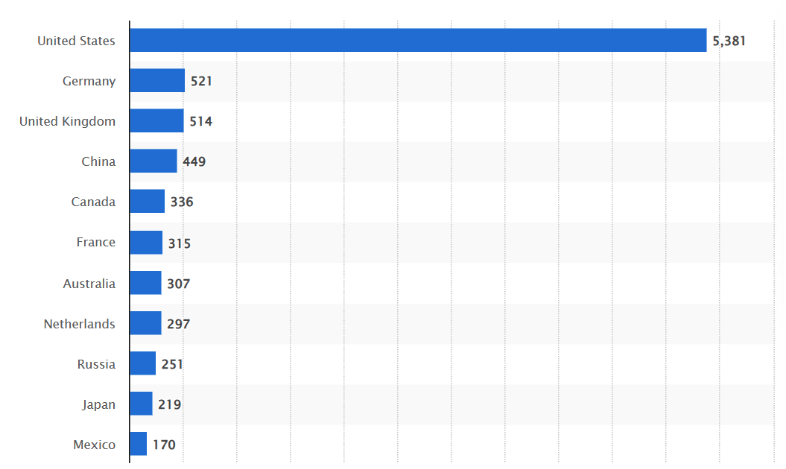
Notably, the United States leads globally in data center infrastructure, housing 5,381 data centers as of March 2024. This extensive network underscores the critical role servers play in supporting the nation’s digital ecosystem.
Source: Statista
In this blog, we’ll clearly compare and distinguish blade servers from rack servers to assist you in making informed decisions tailored to your organization’s needs. Understanding the distinction between these server models is crucial for optimizing performance, scalability, and cost-effectiveness.
What is a Rack Server?
Rack servers are standalone, rack-mountable computers designed to be installed within a standardized framework known as a server rack. Each server operates independently with its own power supply, cooling system, and network connections, allowing for tailored configurations to meet specific organizational needs.
These servers conform to standardized rack dimensions, typically measured in rack units (U), with 1U equating to 1.75 inches in height. This uniformity facilitates efficient stacking and organization within data centers. Rack servers’ key advantage is their scalability; additional units can be seamlessly integrated into existing racks as computing demands grow.
Common Use Cases:
- Small to Medium Businesses: Rack servers are ideal for organizations seeking a balance between performance and space optimization without the complexity of larger infrastructures.
- Applications Requiring Individual Control: They are suitable for scenarios where dedicated resources and configurations are necessary for specific applications or departments.
- General Computing: Rack servers effectively handle a broad range of tasks, including file storage, web hosting, and database management, making them versatile solutions for various computing needs.
The global data center rack server market has grown significantly over the past few years. Valued at $52.1 billion in 209, it expanded at a CAGR of 14.5%, reaching approximately $102.5 billion by the end of 2024. This surge highlights the increasing demand for scalable, high-performance server solutions in enterprise environments and large data centers.

Source: Markets and Markets
What is a Blade Server?
Blade servers are modular computing systems designed to minimize physical footprint and maximize efficiency within modern data centers. Unlike standalone servers, each server blade is a compact, stripped-down unit that slides into a shared blade chassis, which houses essential components such as power supplies, cooling units, and network controllers.
This shared infrastructure enables high-density computing, allowing multiple blades to occupy the same space that would typically host just one traditional server.
Blade servers reduce energy use, simplify maintenance, and streamline deployment by consolidating essential components and enabling centralized management. This makes them especially valuable in enterprise environments with demanding computing power needs.
Common Use Cases
- Large Data Centers and Enterprises: Perfect for environments that require many server types working in tandem while conserving rack space and power.
- Virtualization and Cloud Platforms: Blade servers provide scalable, shared computing resources, ideal for virtual machine hosting and dynamic workloads.
- High-Performance Computing (HPC): Their compact structure and processing efficiency make them suitable for advanced computing tasks such as scientific modeling or real-time analytics.
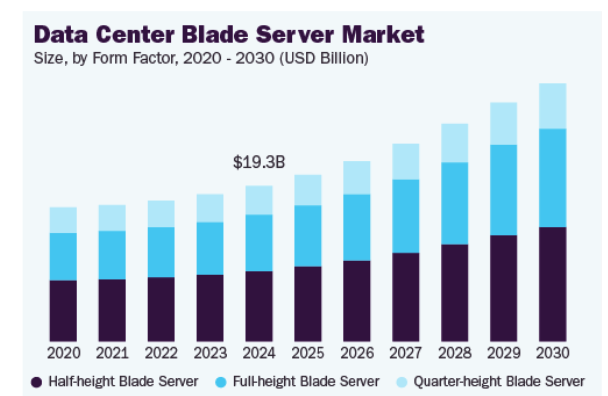
The global data center blade server market has experienced substantial growth, reflecting the increasing demand for efficient and scalable server solutions. In 2024, the market was valued at approximately $19.26 billion and is projected to grow at a CAGR of 9.1% from 2025 to 2030, reaching around $31.94 billion by 2030.
Source: Grand View Research
Key Differences: Blade Server vs. Rack Server
Understanding the distinctions between blade servers and rack servers is crucial for optimizing IT infrastructure. Each server type offers unique advantages and considerations, influencing decisions on data center design, operational efficiency, and scalability.
| Feature | Blade Server | Rack Server |
| Density & Space Utilization | Offers high-density computing by fitting multiple blades into a shared blade chassis, maximizing rack space and conserving physical space. | Requires more rack space since each unit is standalone. Better for setups with fewer servers or varied hardware needs. |
| Power & Cooling | Shares power supplies, cooling units, and networking components. Efficient but may generate more heat in a compact area. | Each unit has individual power supplies and cooling fans, leading to higher power consumption and more cabling. |
| Scalability | Scales by adding additional blades into the same enclosure. Ideal for enterprise data centers and growing workloads. | Scales by installing standalone units into standard racks. Requires more physical space and separate cabling. |
| Management | Centralized control through shared software and unified interfaces; simplifies deployment and ongoing maintenance | Each server is managed independently. Offers more granularity but requires more effort from the IT team. |
| Cost | Higher upfront costs due to the blade enclosure and shared infrastructure can lower operational costs over time. | Lower initial costs and flexibility for small rollouts, but energy and space requirements may increase long-term expenses. |
| Flexibility | Less flexible; optimized for specific high-volume tasks. Best in large data centers with stable infrastructure needs. | Highly versatile; supports diverse server models, configurations, and support services for evolving environments. |
Advantages and Disadvantages
If you’re aiming to optimize your IT infrastructure, it’s crucial to understand the advantages and disadvantages of rack and blade servers.
Rack Servers
Advantages:
- Flexibility: Rack servers are compatible with various hardware configurations, allowing you to customize your steps to meet specific needs.
- Lower Initial Cost: Rack servers typically require a lower upfront investment than blade servers, making them accessible to businesses with budget constraints.
- Easier Individual Upgrades: Since each rack server operates independently, upgrading or replacing components can be done on a per-server basis without affecting the entire system.
Disadvantages:
- Lower Density: Rack servers require more physical space, which can be a limitation if your organization has limited data center capacity.
- Higher Power Consumption per Server: Each rack server has its own power supply, leading to higher overall energy usage compared to shared power solutions.
- Extensive Cabling: The individual setup for rack servers necessitates extensive cabling, which can complicate maintenance and increase the risk of connectivity issues.
Blade Servers
Advantages:
- High Density: Blade servers are designed to fit multiple server modules into a single chassis, maximizing computer power within a compact space.
- Efficient Power and Cooling: Blade servers often achieve greater energy efficiency and simplified thermal management by sharing power supplies and cooling systems within the chassis.
- Simplified Management: Centralized management tools for blade servers allow for streamlined monitoring, deployment, and maintenance processes.
Disadvantages:
- Higher Initial Costs: Blade servers’ sophisticated infrastructure requires a higher upfront investment than traditional rack servers.
- Potential Single Point of Failure: Shared components like power supplies and cooling systems mean that a failure in one of these can impact all servers within the chassis.
- Less Hardware Flexibility: Blade servers’ compact design can limit customization options, making it challenging to accommodate specialized hardware requirements.
Choosing the Right Server: Considerations
When you’re selecting between blade servers and rack servers, its essential to evaluate several key factors to ensure alignment with your organization’s specific needs and objectives:
| Consideration | Blade Server | Rack Server |
| Workload Requirements | Ideal for high-performance computing, virtualization, and cloud environments requiring intensive computing power and resource sharing. | Suited for general computing, multiple servers with dedicated roles, and workloads needing independent control. |
| Scalability Needs | Easily scalable by adding additional blades into a single-blade chassis, perfect for large data centers. | Scalable by adding standalone units, but requires more physical space and may lead to more rack space usage. |
| Budget Constraints | Higher initial cost due to shared infrastructure, but lower long-term operational costs and power consumption. | Offers a lower initial cost, making it suitable for small businesses or departments with tight budgets. |
| Data Center Infrastructure | Requires a specialized blade enclosure, enhanced cooling units, and often custom rack chassis for integration. | Fits into standard racks with minimal modification. Works well with existing infrastructure and traditional servers. |
| Management Expertise | Enables centralized management, reducing admin effort—best for teams with robust IT capabilities. | Managed individually, ideal for IT teams used to working with individual power supplies and standalone units. |
Optimizing Your IT Infrastructure with We Buy Used IT Equipment
Choosing between a blade server vs. rack server setup comes down to understanding your organization’s priorities—whether it’s density, flexibility, power consumption, or budget control.
Each server type plays a distinct role in the broader IT equipment lifecycle. From procurement and installation to upgrades, maintenance, and decommissioning, having a clear service strategy supports better uptime, cost control, and long-term performance. Knowing when to resell, upgrade, or retire assets is key to maintaining operational efficiency and maximizing return on investment.
If your organization is preparing for an infrastructure recalibration or navigating a decommissioning project, partnering with a trusted IT asset disposition (ITAD) provider can make all the difference.
We Buy Used IT Equipment offers end-to-end solutions to help you streamline this process—from secure data erasure and hassle-free logistics to equipment buyback and valuation.
Whether you’re looking to offload legacy rack servers, consolidate your blade chassis, or simply create more room for upgrade systems, our team specializes in helping you recover value from your existing infrastructure. We purchase both blade servers and rack servers, along with associated hardware like storage blades, network controllers, and cooling units.
Contact one of our specialists today to explore your options. We’ll help you simplify the transition and unlock greater value from your IT investments.