In today’s rapidly evolving technological landscape, businesses and individuals frequently upgrade their server CPUs to maintain exceptional performance and energy efficiency. However, this continuous cycle of upgrades contributes significantly to electronic waste, posing environmental challenges that require immediate attention.
What Are Server CPUs?
A server CPU, or server processor, is the central component of a server responsible for processing instructions and executing tasks. Unlike standard desktop CPUs, server-grade CPUs are engineered to handle heavy workloads, manage multiple tasks simultaneously, and ensure system reliability and stability.
Server CPUs are pivotal in data centers. They support critical applications, manage vast amounts of data, and ensure seamless network services.
Environmental Impact of E-Waste
The rise in e-waste has become a pressing concern. In 2022 alone, an estimated 62 billion kg of electronic waste was generated worldwide. However, only 22.3% of this waste was formally collected and recycled in an environmentally responsible manner. Despite efforts to improve recycling rates, the generation of e-waste has grown nearly five times faster than formal recycling efforts since 2010.
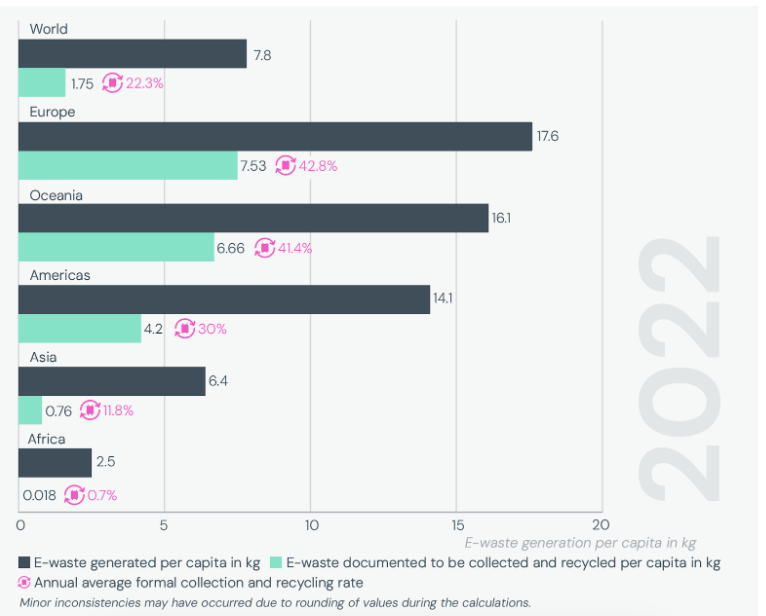
Source: The Global E-waste Monitor 2024
In this article, we’ll explore the best practices for selling and recycling used server CPUs responsibly. We’ll discuss how to determine the value of your server processor, the financial and environmental benefits of reselling server-grade CPUs instead of discarding them, and the essential steps for securely preparing and selling your hardware.
Additionally, we’ll discuss when and how to choose a certified recycling program and share best practices for IT asset management to ensure a more sustainable approach to technology disposal.
Understanding Server CPUs and Their Value
Server CPUs are specialized central processing units designed to handle the demanding tasks of data centers and enterprise environments. They are built for exceptional performance, energy efficiency, and reliability, making them distinct from standard desktop processors.
Types of Server CPUs:
Server processors primarily fall into two categories:
- x86 Processors: Manufactured by companies like Intel and AMD, these processors are prevalent in many servers. Intel’s Xeon series and AMD’s EPYC series are notable examples. Over the years, these processors have evolved through various generations, each bringing enhancements in performance and efficiency.
For instance, Intel’s Xeon processors have progressed from the Nehalem microarchitectures to the latest Sapphire Rapids, while AMD’s EPYC processors have advanced from the first-generation Naples to the most recent Genoa and Bergamo series. - RISC Processors: Reduced Instruction Set Computing (RISC) processors, such as IBM’s POWER series, are commonly used in high-performance and enterprise applications due to their efficiency and scalability, but RISC architecture is widely implemented across various computing domains, including mobile, embedded, and server systems.
Factors Affecting Value:
Several factors influence the value of server CPUs:
- Age and Generation: Newer generations typically offer better performance and features, making them more valuable. Conversely, older models may see a decrease in value over time.
- Performance: Key performance metrics include clock speed, number of cores and threads, and cache size. Processors with higher specifications in these areas can handle heavy workloads more efficiently, increasing their value.
- Market Demand: The demand for specific CPU models can fluctuate based on industry trends and technological advancements. High demand can lead to higher resale values.
- Condition: Well-maintained CPUs that show minimal wear and function flawlessly are more valuable than those with defects or signs of heavy use.
Identify Your CPU
To determine your server CPU’s model number and specifications:
- System Information: On Windows servers, press “Win+R,” type “msinfo32,” and press Enter. This will open the System Information window, where the processor details are listed under the System Summary.
- Device Manager: Click on the Windows button or press the Windows button and search “Device Manager.” Expand the Processors section to view detailed information about each CPU installed.
- Third-Party Tools: Utilities like CPU-Z provide comprehensive details about your CPU, including model number, core count, clock speed, and more.
- BIOS/UEFI Firmware: Accessing the BIOS or UEFI settings during system boot can also provide processor information. Restart the server and press the designated key (commonly F2, Delete, Enter, or Esc) to enter the BIOS/UEFI setup.
The Benefits of Selling Used Server CPUs
Selling your used server CPUs offers multiple advantages, both financially and environmentally.
Financial Returns
By selling your used server processors, you can recoup a portion of your initial investment, offsetting the cost of upgrading to newer technology. This approach provides immediate financial benefits and contributes to a more sustainable IT strategy.
Extending the Lifecycle
When server-grade CPUs are resold, they often find new homes in smaller businesses or educational institutions that can benefit from their capabilities. This practice extends the hardware’s lifecycle, maximizing the utility of the resources and energy invested in their production.
Reducing E-Waste
Recycling and reselling server CPUs are crucial in minimizing electronic waste. Improper disposal of electronic components can lead to environmental pollution due to hazardous materials like lead and mercury. By selling or recycling your CPUs responsibly, you can reduce the environmental footprint associated with e-waste.
How to Sell Your Server CPUs Responsibly
Selling your server CPUs responsibly involves several critical steps to ensure data security and maximize returns.
Preparing your CPUs for Sale
- Proper Removal and Handling: Begin by powering down your server and carefully disconnecting it from any power sources. Use appropriate tools to extract the CPU from the motherboard, ensuring you follow anti-static procedures to prevent damage from static electricity.
- Cleaning and Inspection: Once removed, gently clean the CPU using non-abrasive materials to eliminate dust and debris. Inspect the processor for any physical damage, such as bent pins or thermal paste residue, which could affect its resale value.
- Secure Packaging: Place the CPU in anti-static packaging to protect it from electrostatic discharge during transit. Ensure the processor is securely cushioned within the packaging to prevent movement and potential damage.
Choosing the Right Buyer
- Reputable ITAD Companies: Partnering with certified IT asset disposition (ITAD) companies ensures that your server CPUs are handled in compliance with industry standards, guaranteeing data security and environmental responsibility.
- Online Marketplaces: While platforms like eBay o Amazon offer access to a broad audience, exercise caution. Verify the credibility of buyers and be aware of the platform’s policies regarding electronic components.
- Factors to Consider: Prioritize buyers with relevant certifications, positive customer reviews, and robust data security practices. Ensure they provide clear processes for handling and processing server CPUs.
Data Sanitization
- Importance of Secure Data Wiping: Even if server CPUs don’t store data, associated components like hard drives do. Ensuring these are securely wiped is crucial to prevent unauthorized access to sensitive information.
- Recommended Methods: Utilize data erasure software that complies with recognized industry standards, such as NIST SP 800-88 (Sections 2.5, 4.6, 4.7 and Appendix A), which recommends secure sanitization methods, including a single-pass overwrite, cryptographic erasure, or physical destruction to ensure data is irretrievable.
Sustainable Recycling of Server CPUs
Responsible recycling becomes essential when selling your used server CPUs is no longer feasible, perhaps due to outdated technology or irreparable damage. Recycling ensures environmental protection and recovers valuable materials.
The Recycling Process
Recycling server processors involves several key steps:
- Component Dismantling: Servers are disassembled into individual parts, such as motherboards, central processing units, random access memory (RAM), and power supplies.
- Material Separation: These components are further broken down into materials like metals, plastics, and circuit boards for specialized recycling.
Choosing Certified Recyclers
Selecting a certified recycler ensures adherence to stringent environmental and safety standards:
- e-Stewards Certification: This standard prohibits exporting hazardous e-waste to developing countries and emphasizes domestic processing, aligning with the Basel Convention.
- R2 Certification: The Responsible Recycling (R2) Standard focuses on maximizing reuse and material recovery even if it incurs higher costs than disposal.
Both certifications aim to ensure environmentally responsible recycling practices and secure data destruction, contributing to sustainability and data protection.
Environmental Impact of Proper Recycling
Proper recycling of server CPUs offers significant environmental benefits:
- Resource Conservation: Recycling recovers precious metals and materials, reducing the need for new mining operations.
- Energy Savings: Reusing materials consumes less energy than producing new ones, lowering the overall carbon footprint.
Best Practices for Businesses and Individuals
Effective IT asset management is crucial for both businesses and individuals aiming to optimize their technology investments and promote sustainability. Implementing best practices ensures that IT assets are utilized efficiently, costs are controlled, and environmental impacts are minimized.
Asset Management
Establishing a comprehensive IT asset management (ITAM) system is foundational. This system involves systematically identifying, maintaining, upgrading, and disposing of IT assets. A well-structured ITAM system helps teams avoid outages, facilitates innovation, and reduces costs.
Regular Hardware Audits
Conducting regular hardware audits is essential to ensure that all IT assets are accounted for and functioning optimally. These audits help in identifying underutilized or obsolete equipment, enabling you to make informed decisions about upgrades, reallocations, or disposals. Regular evaluations also assist in maintaining accurate inventories, which are crucial for budgeting and strategic planning.
Partnering with Sustainable ITAD Providers
Collaborating with reputable ITAD providers ensures that retired IT assets are managed responsibly. Certified ITAD partners offer expertise in secure data destruction, environmentally sound recycling practices, and compliance with regulatory standards.
Partnering with such providers not only safeguards sensitive information but also reinforces your company’s commitment to sustainability.
Maximize Returns and Minimize E-Waste with We Buy Used IT Equipment
Upgrading the server CPU is inevitable if you want exceptional performance and energy efficiency. However, eco-friendly disposal and resale play crucial roles in minimizing e-waste and maximizing the value of used IT assets.
Understanding the value of server processors can help you make informed decisions about whether to sell or recycle your hardware. Selling used server-grade CPUs provides financial returns, extends the lifespan of technology investments, and reduces environmental impact. Meanwhile, certified recycling programs ensure that outdated or non-functional server processors are disposed of in an environmentally responsible manner.
Choosing to sell or recycle your server CPUs responsibly helps you recover a portion of your initial investment while contributing to sustainability. Working with a trusted ITAD provider ensures that data security measures are upheld and materials are reused or recycled according to industry standards.
We provide secure and sustainable solutions for selling and recycling used server CPUs at We Buy Used IT Equipment. We offer fair market value and certified data destruction services.
If you’re looking to sell or responsibly recycle your server CPUs, our team of experts at We Buy Used IT Equipment can offer a secure and sustainable solution. We ensure a hassle-free process, providing you with a free quote, secure handling, and industry-compliant recycling solutions.
Contact us today and learn how we can help you maximize your returns while minimizing your environmental impact.