Skip to content
Facebook Instagram X-twitter Youtube Linkedin

West Coast: (800) 700-7683 — East Coast: (800) 821-1782 — 9033 9th St. Rancho Cucamonga, CA 91730

We Buy Used IT Equipment

Powered By DES

  • Sell Your Equipment
    • Servers
      • Cisco
      • Dell
      • IBM
      • HP
      • Lenovo
      • SuperMicro
    • Backup Tapes
      • LTO Tapes
        • LTO10
        • LTO9
        • LTO8
        • LTO7
        • LTO6
        • LTO5
        • LTO4
        • LTO3
        • LTO Cleaning Tape
      • 3592 Tapes
        • 3592 JK
        • 3592 JE
        • 3592 JD
        • 3592 JC
        • 3592 JB
        • 3592 JA
      • T10k T2 Tapes
      • MLR/SLR Tapes
        • IBM MLR1 SLR32
        • Imation SLR32
        • Sony SLR5
        • Tandberg SLR
        • MLR/SLR Cleaning Tape
      • 4mm Tapes
        • DDS7 – DAT320
        • DDS6 – DAT160
        • DDS5 – DAT72
        • DDS4 – DAT40
      • 8mm VXA Tapes
    • Data Storage
      • Hard Drives
        • HGST
        • Hitachi
        • HP
        • IBM
        • Kingston
        • Samsung
        • Seagate
        • Toshiba
        • Western Digital
      • Storage Arrays
    • Networking
      • Routers
      • Switches
    • VoIP and Telecom
    • Memory
      • Server Memory
      • Laptop Memory
      • Desktop Memory
      • DDR3
      • DDR4
      • DDR5
    • CPUs and Processors
      • Intel Core
      • Intel Xeon
      • AMD
    • Laptops
      • Apple
      • Asus
      • Dell
      • HP
      • IBM Lenovo
      • Samsung
      • Toshiba
    • Tape Drives and Libraries
    • SFP Transceivers
      • Cisco SFP Transceivers
      • HPE SFP Transceivers
    • Scrap Electronics
    • Submit Your List
  • Services
    • Secure IT Asset Disposition
      • Secure Shipping
    • Data Center Services
      • Takeouts
      • Relocation
      • Liquidation
      • Other On-Site Services
    • Data Destruction
      • Data Destruction Compliance
        • Certificate of Data Destruction
        • Physical Data Destruction
        • Permanent Data Erasure
        • Magnetic Degaussing
      • Data Tape Erasure
      • Hard Drive Disposition
        • Hard Drive Sanitization
    • Electronics Recycling
    • Global Advantage Partner
    • Donate to Charity
  • Buy Equipment
    • Backup Tape
    • Data Center Equipment
    • New Equipment
    • Refurbished Equipment
      • Refurbished Servers
    • Warranty Information
  • Lifecycle & Sustainability
    • Lifecycle Services
      • Secure IT Asset Disposition
      • Electronics Recycling
      • Donate IT Equipment to Charity
      • Our ITAD Process
      • Secure Equipment Shipping
    • Resources
      • IT Equipment Recycling
      • E Waste Recycling
      • IT Asset Disposition Guide
      • Data Center Decommissioning
      • Comprehensive Guide to ITAD
      • Guide to Donating IT Equipment to Charity
  • Blog
  • About Us
    • Contact Us
    • Our Processes
    • ITAD White Paper
    • Newsletter
    • References
    • Privacy Policy
    • FAQ
    • Sitemap
  • Get A Quote
  • Sell Your Equipment
    • Servers
      • Cisco
      • Dell
      • IBM
      • HP
      • Lenovo
      • SuperMicro
    • Backup Tapes
      • LTO Tapes
        • LTO10
        • LTO9
        • LTO8
        • LTO7
        • LTO6
        • LTO5
        • LTO4
        • LTO3
        • LTO Cleaning Tape
      • 3592 Tapes
        • 3592 JK
        • 3592 JE
        • 3592 JD
        • 3592 JC
        • 3592 JB
        • 3592 JA
      • T10k T2 Tapes
      • MLR/SLR Tapes
        • IBM MLR1 SLR32
        • Imation SLR32
        • Sony SLR5
        • Tandberg SLR
        • MLR/SLR Cleaning Tape
      • 4mm Tapes
        • DDS7 – DAT320
        • DDS6 – DAT160
        • DDS5 – DAT72
        • DDS4 – DAT40
      • 8mm VXA Tapes
    • Data Storage
      • Hard Drives
        • HGST
        • Hitachi
        • HP
        • IBM
        • Kingston
        • Samsung
        • Seagate
        • Toshiba
        • Western Digital
      • Storage Arrays
    • Networking
      • Routers
      • Switches
    • VoIP and Telecom
    • Memory
      • Server Memory
      • Laptop Memory
      • Desktop Memory
      • DDR3
      • DDR4
      • DDR5
    • CPUs and Processors
      • Intel Core
      • Intel Xeon
      • AMD
    • Laptops
      • Apple
      • Asus
      • Dell
      • HP
      • IBM Lenovo
      • Samsung
      • Toshiba
    • Tape Drives and Libraries
    • SFP Transceivers
      • Cisco SFP Transceivers
      • HPE SFP Transceivers
    • Scrap Electronics
    • Submit Your List
  • Services
    • Secure IT Asset Disposition
      • Secure Shipping
    • Data Center Services
      • Takeouts
      • Relocation
      • Liquidation
      • Other On-Site Services
    • Data Destruction
      • Data Destruction Compliance
        • Certificate of Data Destruction
        • Physical Data Destruction
        • Permanent Data Erasure
        • Magnetic Degaussing
      • Data Tape Erasure
      • Hard Drive Disposition
        • Hard Drive Sanitization
    • Electronics Recycling
    • Global Advantage Partner
    • Donate to Charity
  • Buy Equipment
    • Backup Tape
    • Data Center Equipment
    • New Equipment
    • Refurbished Equipment
      • Refurbished Servers
    • Warranty Information
  • Lifecycle & Sustainability
    • Lifecycle Services
      • Secure IT Asset Disposition
      • Electronics Recycling
      • Donate IT Equipment to Charity
      • Our ITAD Process
      • Secure Equipment Shipping
    • Resources
      • IT Equipment Recycling
      • E Waste Recycling
      • IT Asset Disposition Guide
      • Data Center Decommissioning
      • Comprehensive Guide to ITAD
      • Guide to Donating IT Equipment to Charity
  • Blog
  • About Us
    • Contact Us
    • Our Processes
    • ITAD White Paper
    • Newsletter
    • References
    • Privacy Policy
    • FAQ
    • Sitemap
  • Get A Quote

Software vs. Hardware: Understanding the Difference

Servers
  • Alex
  • February 28, 2022
  • 8:56 pm
Browse:
Home Servers Software vs. Hardware: Understanding the Difference

Imagine a car with an engine, wheels and body which are the physical parts, and a driver and GPS system which provide the instructions and guidance. Likewise, a computer system has hardware which is the physical framework and software that brings it to life by executing instructions and doing specific tasks.

It’s important to understand the difference between computer hardware and software in today’s digital world where technology is everywhere. 

Did you know that in 2023, global IT spending on hardware and software was $4.9 trillion? This is expected to reach $5.26 trillion by the end of 2024. That’s how important they are to each other in powering modern technology.

In this article, we will look at the differences between hardware and software, their roles in a computer system, and how they work together on a shared user interface to get things done.

What is Software?

Software refers to a set of instructions, programs or data that a computer uses to do specific tasks. Unlike hardware which is made up of physical components, software is intangible and exists as code written in programming languages. 

It’s the connecting bridge between the user and the hardware and allows the computer to execute instructions.

The types of software to know include: 

  1. System Software: This type of software manages the computer’s hardware and provides a base for application software to work. Examples are operating systems like Windows, macOS and Linux and device drivers that enable communication between hardware and software.
  2. Application Software: These are programs that do specific tasks for users. Examples are word processing software, an internet browser, and games.

Here are some common examples to know: 

  • Operating Systems: Windows, Android, iOS
  • Word Processors: Microsoft Word, Google Docs
  • Games: Minecraft, Fortnite
  • Web Browsers: Chrome, Firefox, Safari

From executing instructions to helping users do specific tasks, software is an essential part of everyday tasks and modern computing for people around the world.

What is Hardware?

Hardware refers to the physical parts of a computer system that you can touch and see. These physical parts work together to process data, execute instructions, and deliver results to the user. Hardware is the machine that runs software programs.

The computer hardware components that make up a computer system include: 

  1. Central Processing Unit (CPU): The brain of the computer that processes data and executes instructions.
  2. Random Access Memory (RAM): Volatile memory that temporarily stores data for quick access while the computer is running.
  3. Storage Devices: Hard disks and hard drives, solid-state drives (SSDs), and flash drives for data storage.
  4. Input Devices: Physical devices like keyboards, mice, and scanners that allow users to interact with the computer.
  5. Output Devices: Monitors, printers and speakers that deliver results to the user.

The most common examples of hardware you’ve come across include: 

  • Desktops: Traditional computers designed for office or home use.
  • Laptops: Portable computers for mobile productivity.
  • Servers: High-performance machines designed to manage networked applications and data.

To put it simply, from the CPU to monitors, hardware is everything physical that makes a computer work.

Software vs. Hardware: A Closer Look
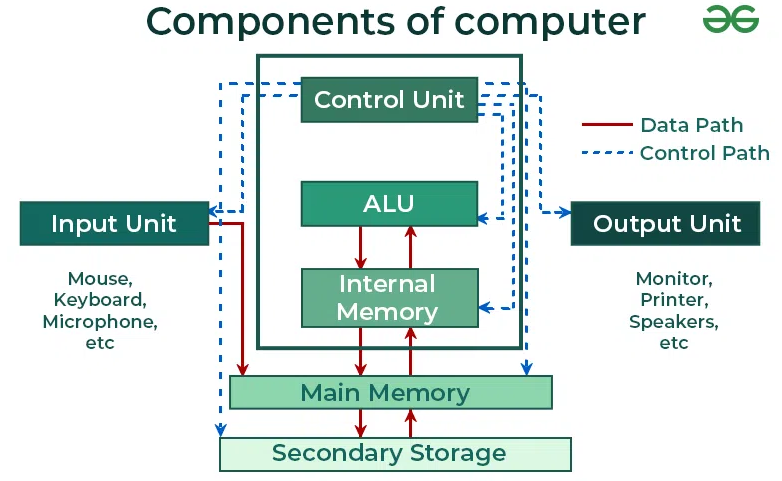
To really get the difference between hardware and software, you need to look at the whole picture of how they work together and depend on each other. Hardware is the physical parts of the computer, software is the set of instructions that tells the hardware what to do. 

Let’s dive into their individual characteristics and how they fit together.

How Software and Hardware Interact

The operating system is the bridge between software and hardware. It allows them to talk to each other. The OS manages the hardware resources like the CPU, RAM and storage devices so they work together to do tasks. 

Without the operating system, software applications wouldn’t be able to use the hardware components properly.
Source: GeeksforGeeks

Software programs, on the other hand, are sets of instructions written in a language the computer’s hardware can understand. 

For example, when you use Chrome or Google Docs, the software translates your inputs into commands the hardware can execute. When you press a key on the keyboard (an input device), it sends a signal to the CPU which processes the data and displays the output on your screen. 

This is what powers modern computing systems.

The Difference Between a Software Server and a Hardware Server

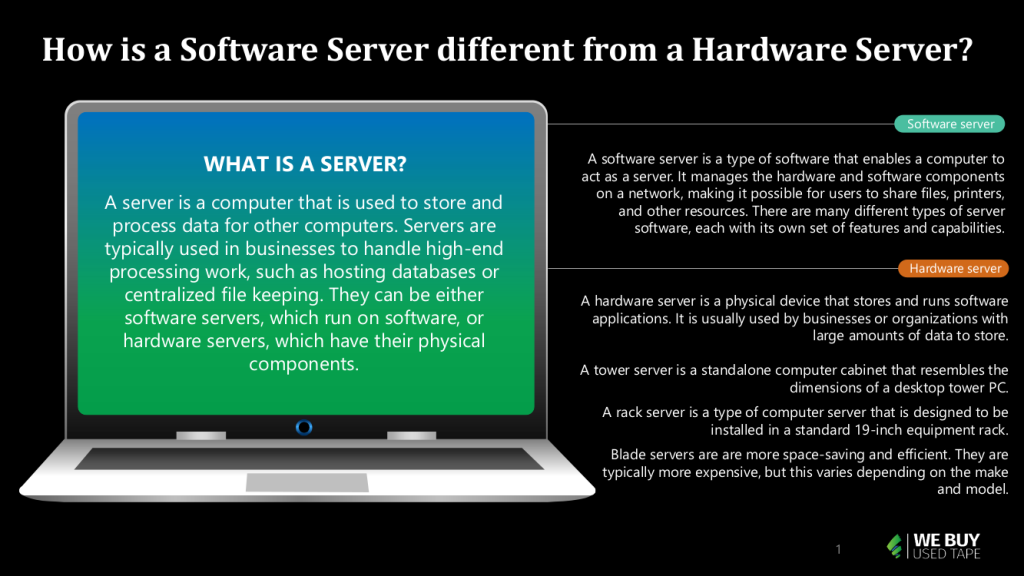
When it comes to servers, understanding the difference between software servers and hardware servers is crucial to choosing the right one for you. Let’s get into the details.

Software Servers

Software servers are virtual entities that run on physical hardware servers. They use system software and virtualization technologies to allocate resources.

Key Features:

  • Run on virtual machines or containerization (e.g. VMware, Docker).
  • Use shared resources like CPU, RAM and storage from a physical machine.
  • Can run multiple instances, so resource utilization is cost effective.

Common Types:

  • Web servers for hosting websites (e.g., Apache, Nginx).
  • Database servers for managing data (e.g., MySQL, PostgreSQL).
  • Application servers for running specific business software.

Advantages:

  • Highly scalable and flexible, can adapt to workload quickly.
  • Cost effective, can run multiple servers on a single physical machine.

Hardware Servers

Hardware servers are the physical bits that software servers run on. They’re physical, standalone boxes designed for reliability and performance.

Key Features:

  • Have internal components like a central processing unit (CPU), storage (hard drives or solid-state drives), and power supplies.
  • Are dedicated resources for specific purposes.

Examples:

  • Rack servers used in data centers.
  • Tower servers, like desktop PCs, for smaller businesses.
  • Blade servers, high performance in a small package.

Advantages:

  • Consistent high performance.
  • Great for tasks that require lots of resources, like data storage or heavy computations.

Working Together

Software runs on hardware servers, so you have a complete environment for processing data, workload management and application running.

Source: Digital Technologies Hub

Device drivers also bridge the gap between hardware and software, so it all works.

The balance element comes in when you recognize both are parts of computer systems. Hardware provides the physical foundation and software provides the functionality to perform specific tasks.

Choosing between the two—or effectively combining them—depends on your operational needs, budget, and scalability goals.

Upgrade Your IT Infrastructure with We Buy Used IT Equipment

Knowing the difference between software and hardware is key to optimizing your IT. While software programs make your devices do specific tasks, the physical components of hardware like CPUs, RAM, and storage are the foundation of any computer system. Both must work together for smooth operation and high performance.

A well-maintained and balanced IT infrastructure is important for all businesses. Upgrading your hardware devices and updating your system software can increase productivity, reduce downtime and prevent hardware or software issues.

Looking to upgrade without the cost? We Buy Used IT Equipment has a large selection of quality hardware. Replacing old systems or expanding your business? We can help you find the right bits to fit your needs.

So, are you ready to enhance your IT setup today?

  • Browse our inventory to find your solution.
  • Get refurbished equipment.
  • Sell us your old devices and make room for better performing ones.

Take the first step toward a more efficient IT environment. 

Contact us now to upgrade your hardware and streamline your operations!

Browse:
Home Servers Software vs. Hardware: Understanding the Difference

Get A Quote

Fill our form here
PrevPreviousHow to Create a Custom Hardware Server
NextWHAT STORAGE HARDWARE DO YOU NEED FOR A CUSTOM GAMING PC?Next
Picture of Alex

Alex

Expertise With over 15 years of experience in marketing and business development, Alex is a seasoned strategist in digital marketing, content creation, and brand growth, Ge has grown as a trusted voice in the technology and business sectors over the past decade. Education Alex holds a Master’s degree in Entrepreneurship and dual Bachelor’s degrees in Marketing and Entrepreneurial Management from California State University - San Bernardino. Experience Alex has led high-impact initiatives that have driven significant revenue growth, brand expansion, and customer engagement. His work includes managing e-commerce operations, optimizing digital advertising strategies, and developing content that educates and informs professionals about technology and business trends. Outside of Work Beyond his professional endeavors, Alex enjoys staying active and spending quality time with family.
All Posts

Client
Testimonials

“The buyback program was easy for me to use. I simply sent WEBUY an email with the list of surplus items that I had. WEBUY replied back with a quoted value. I then shipped WBUY the tapes and quickly received payment. The process was very easy and I felt good that I wasn’t throwing the equipment into the landfill and someone else can make use of them.

I will do business with WBUY again.”

Bay Industries Inc.

“I have to say once I found you the process was relatively quick and straightforward. Your website provided great details and once I submitted my inventory within 24 hours I had a quote and confirmation of the dollar amount.

The entire process from shipment to check in hand was painless and quick, I will most definitely use this service again and have already recommended it to my other peers.”

Masons of California

Subscribe to our newsletter

Your inbox deserves better. Sign up for regular updates, insights, and deals!

  • Sorry, this service is unavailable in your country.

  • Should be Empty:
Visit Us
  • 9th St. Rancho Cucamonga, CA 91730
  • West Coast: (800) 700-7683
  • East Coast: (800) 821-1782
  • Local: (909) 466-7680
We Buy Used IT Equipment

Powered By DES

Facebook Instagram X-twitter Youtube Linkedin
BUY EQUIPMENT
  • Backup Tape
  • New Equipment
  • Refurbished Equipment
  • Warranty Info
  • Backup Tape
  • New Equipment
  • Refurbished Equipment
  • Warranty Info
SELL EQUIPMENT
  • Servers
  • Backup Tape
  • Removable Storage
  • Telecom & VOIP
  • Networking & Switches
  • Memory
  • CPUs and Processors
  • Laptops
  • Tape Drives
  • SFP Transceivers
  • Scrap Electronics
  • Servers
  • Backup Tape
  • Removable Storage
  • Telecom & VOIP
  • Networking & Switches
  • Memory
  • CPUs and Processors
  • Laptops
  • Tape Drives
  • SFP Transceivers
  • Scrap Electronics
SERVICES
  • IT Asset Disposition
  • Data Destruction
  • Data Center Services
  • Secure Shipping
  • Donate Your Assets
  • International Sales
  • Onsite Services
  • Electronics Recycle
  • IT Asset Disposition
  • Data Destruction
  • Data Center Services
  • Secure Shipping
  • Donate Your Assets
  • International Sales
  • Onsite Services
  • Electronics Recycle
STAY INFORMED
  • Blog
  • About Us
  • Contact Us
  • Our Process
  • FAQ
  • Sitemap
  • Blog
  • About Us
  • Contact Us
  • Our Process
  • FAQ
  • Sitemap

© 2025 All Rights Reserved. Website created with ❤ by mrrssy.

Skip to content
Open toolbar Accessibility Tools

Accessibility Tools

  • Increase TextIncrease Text
  • Decrease TextDecrease Text
  • GrayscaleGrayscale
  • High ContrastHigh Contrast
  • Negative ContrastNegative Contrast
  • Light BackgroundLight Background
  • Links UnderlineLinks Underline
  • Readable FontReadable Font
  • Reset Reset
  • SitemapSitemap
  • FeedbackFeedback