Skip to content
Facebook Instagram X-twitter Youtube Linkedin

West Coast: (800) 700-7683 — East Coast: (800) 821-1782 — 9033 9th St. Rancho Cucamonga, CA 91730

We Buy Used IT Equipment
Powered By DES
  • Sell Your Equipment
    • Servers
      • Cisco
      • Dell
      • IBM
      • HP
      • Lenovo
      • SuperMicro
    • Backup Tapes
      • LTO Tapes
        • LTO10
        • LTO9
        • LTO8
        • LTO7
        • LTO6
        • LTO5
        • LTO4
        • LTO3
        • LTO Cleaning Tape
      • 3592 Tapes
        • 3592 JK
        • 3592 JE
        • 3592 JD
        • 3592 JC
        • 3592 JB
        • 3592 JA
      • T10k T2 Tapes
      • MLR/SLR Tapes
        • IBM MLR1 SLR32
        • Imation SLR32
        • Sony SLR5
        • Tandberg SLR
        • MLR/SLR Cleaning Tape
      • 4mm Tapes
        • DDS7 – DAT320
        • DDS6 – DAT160
        • DDS5 – DAT72
        • DDS4 – DAT40
      • 8mm VXA Tapes
    • Data Storage
      • Hard Drives
        • HGST
        • Hitachi
        • HP
        • IBM
        • Kingston
        • Samsung
        • Seagate
        • Toshiba
        • Western Digital
      • Storage Arrays
    • Networking
      • Routers
      • Switches
    • VoIP and Telecom
    • Memory
      • Server Memory
      • Laptop Memory
      • Desktop Memory
      • DDR3
      • DDR4
      • DDR5
    • CPUs and Processors
      • Intel Core
      • Intel Xeon
      • AMD
    • Laptops
      • Apple
      • Asus
      • Dell
      • HP
      • IBM Lenovo
      • Samsung
      • Toshiba
    • Tape Drives and Libraries
    • SFP Transceivers
      • Cisco SFP Transceivers
      • HPE SFP Transceivers
    • Scrap Electronics
    • Submit Your List
  • Services
    • Secure IT Asset Disposition
      • Secure Shipping
    • Data Center Services
      • Takeouts
      • Relocation
      • Liquidation
      • Other On-Site Services
    • Data Destruction
      • Data Destruction Compliance
        • Certificate of Data Destruction
        • Physical Data Destruction
        • Permanent Data Erasure
        • Magnetic Degaussing
      • Data Tape Erasure
      • Hard Drive Disposition
        • Hard Drive Sanitization
    • Electronics Recycling
    • Global Advantage Partner
    • Donate to Charity
  • Buy Equipment
    • Backup Tape
    • Data Center Equipment
    • New Equipment
    • Refurbished Equipment
      • Refurbished Servers
    • Warranty Information
  • Lifecycle & Sustainability
    • Lifecycle Services
      • Secure IT Asset Disposition
      • Electronics Recycling
      • Donate IT Equipment to Charity
      • Our ITAD Process
      • Secure Equipment Shipping
    • Resources
      • IT Equipment Recycling
      • E Waste Recycling
      • IT Asset Disposition Guide
      • Data Center Decommissioning
      • Comprehensive Guide to ITAD
      • Guide to Donating IT Equipment to Charity
  • Blog
  • About Us
    • Contact Us
    • Our Processes
    • ITAD White Paper
    • Newsletter
    • References
    • Privacy Policy
    • FAQ
    • Sitemap
  • Get A Quote
  • Sell Your Equipment
    • Servers
      • Cisco
      • Dell
      • IBM
      • HP
      • Lenovo
      • SuperMicro
    • Backup Tapes
      • LTO Tapes
        • LTO10
        • LTO9
        • LTO8
        • LTO7
        • LTO6
        • LTO5
        • LTO4
        • LTO3
        • LTO Cleaning Tape
      • 3592 Tapes
        • 3592 JK
        • 3592 JE
        • 3592 JD
        • 3592 JC
        • 3592 JB
        • 3592 JA
      • T10k T2 Tapes
      • MLR/SLR Tapes
        • IBM MLR1 SLR32
        • Imation SLR32
        • Sony SLR5
        • Tandberg SLR
        • MLR/SLR Cleaning Tape
      • 4mm Tapes
        • DDS7 – DAT320
        • DDS6 – DAT160
        • DDS5 – DAT72
        • DDS4 – DAT40
      • 8mm VXA Tapes
    • Data Storage
      • Hard Drives
        • HGST
        • Hitachi
        • HP
        • IBM
        • Kingston
        • Samsung
        • Seagate
        • Toshiba
        • Western Digital
      • Storage Arrays
    • Networking
      • Routers
      • Switches
    • VoIP and Telecom
    • Memory
      • Server Memory
      • Laptop Memory
      • Desktop Memory
      • DDR3
      • DDR4
      • DDR5
    • CPUs and Processors
      • Intel Core
      • Intel Xeon
      • AMD
    • Laptops
      • Apple
      • Asus
      • Dell
      • HP
      • IBM Lenovo
      • Samsung
      • Toshiba
    • Tape Drives and Libraries
    • SFP Transceivers
      • Cisco SFP Transceivers
      • HPE SFP Transceivers
    • Scrap Electronics
    • Submit Your List
  • Services
    • Secure IT Asset Disposition
      • Secure Shipping
    • Data Center Services
      • Takeouts
      • Relocation
      • Liquidation
      • Other On-Site Services
    • Data Destruction
      • Data Destruction Compliance
        • Certificate of Data Destruction
        • Physical Data Destruction
        • Permanent Data Erasure
        • Magnetic Degaussing
      • Data Tape Erasure
      • Hard Drive Disposition
        • Hard Drive Sanitization
    • Electronics Recycling
    • Global Advantage Partner
    • Donate to Charity
  • Buy Equipment
    • Backup Tape
    • Data Center Equipment
    • New Equipment
    • Refurbished Equipment
      • Refurbished Servers
    • Warranty Information
  • Lifecycle & Sustainability
    • Lifecycle Services
      • Secure IT Asset Disposition
      • Electronics Recycling
      • Donate IT Equipment to Charity
      • Our ITAD Process
      • Secure Equipment Shipping
    • Resources
      • IT Equipment Recycling
      • E Waste Recycling
      • IT Asset Disposition Guide
      • Data Center Decommissioning
      • Comprehensive Guide to ITAD
      • Guide to Donating IT Equipment to Charity
  • Blog
  • About Us
    • Contact Us
    • Our Processes
    • ITAD White Paper
    • Newsletter
    • References
    • Privacy Policy
    • FAQ
    • Sitemap
  • Get A Quote

WHAT STORAGE HARDWARE DO YOU NEED FOR A CUSTOM GAMING PC?

Computers, Gaming
  • Alex
  • March 3, 2022
  • 10:37 am
Browse:
Home Computers WHAT STORAGE HARDWARE DO YOU NEED FOR A CUSTOM GAMING PC?

Storage Media Types

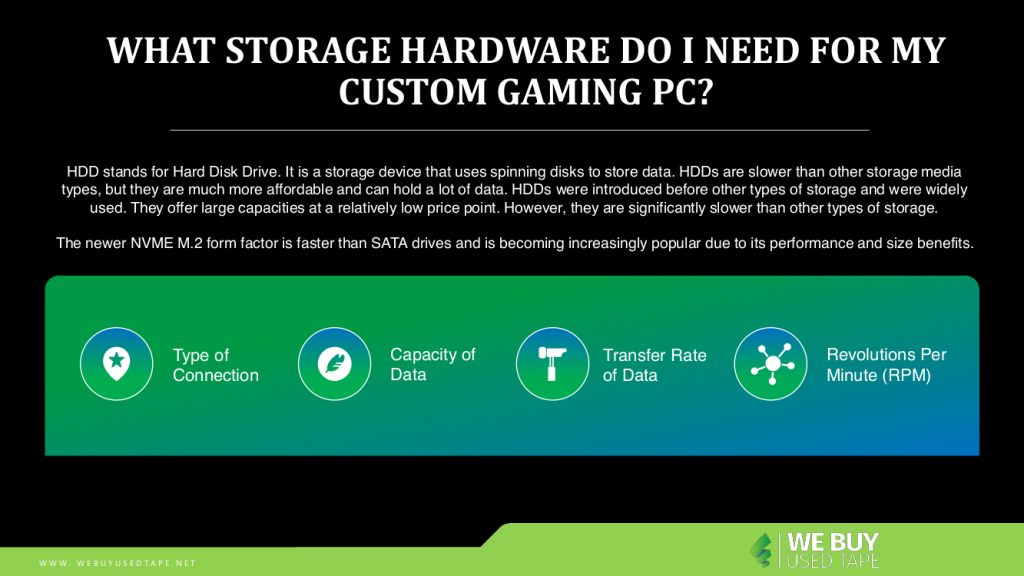
HDD stands for Hard Disk Drive. It is a storage device that uses spinning disks to store data. HDDs are slower than other storage media types, but they are much more affordable and can hold a lot of data. HDDs were introduced before other types of storage and were widely used. They offer large capacities at a relatively low price point. However, they are significantly slower than other types of storage.

Solid State Drives, or SSDs, have recently become a popular storage medium for custom gaming PCs. They offer fast read and write speeds, which is ideal for gaming applications. Additionally, they are less prone to data loss or damage than traditional hard drives. As such, if you are building a custom gaming PC, it is highly recommended that you use an SSD as your primary storage device.

Solid-State Drives are a popular choice for storage media in custom gaming PCs. They come in a variety of form factors, the most common being SATA drives and NVME M.2 drives.

The newer NVME M.2 form factor is faster than SATA drives and is becoming increasingly popular due to its performance and size benefits.

M.2 SATA solid-state drives are a type of storage media that come in the form of a Mini PCIe card. They offer high performance and low power consumption, making them ideal for custom gaming PCs.

https://youtu.be/Mi2rB6C3bF8

Storage Media Specifications

  1. Type of Connection

There are three types of connections you can use to connect your custom PC to other devices: internal drive, external drive, and network-attached storage (NAS).

An internal drive is an SSD or HDD that is placed inside the case. An external drive is a USB, FireWire, eSATA, or Thunderbolt port on the back of the case. A NAS is a device that is connected to your home network and can hold your files.

The most common are external drives, which connect to your computer via a USB, FireWire, eSATA, or Thunderbolt port on the back of the case.

There are different types of storage media, the most common of which are network-attached storage (NAS) and external hard drives. NAS is a device that is connected to your home network and can hold your files. This is a great option if you have a lot of files that you want to store in one place.

  • Capacity of Data

Many people understand the importance of a data capacity, but few know exactly what it is. A data capacity is the amount of data that can be stored in a particular medium or type, typically expressed in gigabytes or terabytes.

  • Transfer Rate of Data

The data transfer rate is the speed at which data can be transferred from one point to another. This measurement is typically in bits per second (bps) and is determined by several factors, including the type of connection, the distance between points, and the amount of traffic on the network.

Simply put, the higher the data transfer rate, the faster information can be sent between devices. This is essential for efficient communication and helps to prevent any lag or buffering. Consequently, it’s important to consider a storage media’s data transfer rate when making your purchase decision.

  • Revolutions Per Minute (RPM)

The Revolutions per Minute (RPM) is a measure of how quickly the CPU is working. This number is important to know if you want to buy a new computer because it will tell you how fast the computer can handle tasks.

HDD speed is usually measured in revolutions per minute (RPM). This number indicates how many times the disk inside the HDD can rotate per minute. The faster the RPM, the faster your computer will be able to read and write data to/from the HDD.
  • Other Specifications

When considering a data storage unit, the most important specification is its launch date.

The most important specification for a data storage unit is its launch date. This date determines the period during which the data will be accessible. Other specifications, such as capacity and durability, are secondary to this criterion.

The most important specification for a data storage unit is its launch date. The processor and other system components can be damaged by altering clock frequency or voltage, so it’s important to make sure that these specifications are consistent with the ones listed on the device’s label.

Why do you require a fast hard drive for games?

One of the most important factors for gaming is having a fast hard drive. When you’re playing games, your hard drive is constantly reading and writing data. If you have a slow hard drive, it can cause your games to take longer to load and run slowly.

One of the main issues that gamers face is decreased frame rates and lags, which are often caused by a slow storage drive. When game files are stored on a fast drive such as an SSD, however, these problems can be fixed.

What type of storage is right for you?

When building a custom gaming PC, one of the most important decisions you will make is what storage to buy. This decision is based on a variety of factors, including the games you like to play and your budget. Keep the following points in mind when deciding for gaming pc storage:

The first thing to consider is what type of storage you need. Hard drives offer more storage capacity but are slower than solid-state drives. If you plan on storing a lot of games on your PC, then you will need a large hard drive. However, if you only plan on playing a few games and want faster load times, then an SSD is the better option.

– The second thing to consider is how many drives you want. Most gaming PCs come with one or two drives. If you want more storage, you can add additional drives.

– The last thing to consider is your budget. Storage is not as expensive as it used to be, but it still varies in price depending on the type of drive and the amount of storage you need.
HDD vs. SSD vs. NVMe

There are three main storage devices that you can use in your custom gaming PC: HDD, SSD, and NVMe. Each has its benefits and drawbacks, so it’s important to choose the right one for your needs.

NVMe SSDs are storage devices that connect to a computer motherboard via the PCIe bus. They offer much higher throughput than traditional SATA SSDs or HDDs, making them ideal for gaming and other high-performance applications.

NVMe is a newer storage protocol that is much faster than both HDD and SSD. It uses PCIe lanes to communicate with the system, making it a great choice for gaming PCs. However, NVMe drives are more expensive than their HDD and SSD counterparts.

HDD, or hard disk drive, has a spinning disk that can hold a lot of data. However, it is slower than SSDs and NVMe drives because it needs to wait for the disk to spin around to the correct location before it can read or write data. SSDs, or solid-state drives, don’t have any moving parts so they are much faster than HDDs. NVMe stands for Non-Volatile Memory Express and is a newer type of storage technology that is even faster than SSDs.

NVMe storage devices are becoming more popular in the custom gaming PC market. They offer many benefits over traditional spinning hard drives (HDDs) and solid-state drives (SSDs). NVMe drives are more power-efficient, meaning they consume less power when idle. They also offer significantly higher performance and lower latencies than HDDs and SSDs.

Browse:
Home Computers WHAT STORAGE HARDWARE DO YOU NEED FOR A CUSTOM GAMING PC?

Get A Quote

Fill our form here
PrevPreviousSoftware vs. Hardware: Understanding the Difference
NextHow to Format My Used Server Equipment for ResaleNext
Picture of Alex

Alex

Expertise With over 15 years of experience in marketing and business development, Alex is a seasoned strategist in digital marketing, content creation, and brand growth, Ge has grown as a trusted voice in the technology and business sectors over the past decade. Education Alex holds a Master’s degree in Entrepreneurship and dual Bachelor’s degrees in Marketing and Entrepreneurial Management from California State University - San Bernardino. Experience Alex has led high-impact initiatives that have driven significant revenue growth, brand expansion, and customer engagement. His work includes managing e-commerce operations, optimizing digital advertising strategies, and developing content that educates and informs professionals about technology and business trends. Outside of Work Beyond his professional endeavors, Alex enjoys staying active and spending quality time with family.
All Posts

Client
Testimonials

“The buyback program was easy for me to use. I simply sent WEBUY an email with the list of surplus items that I had. WEBUY replied back with a quoted value. I then shipped WBUY the tapes and quickly received payment. The process was very easy and I felt good that I wasn’t throwing the equipment into the landfill and someone else can make use of them.

I will do business with WBUY again.”

Bay Industries Inc.

“I have to say once I found you the process was relatively quick and straightforward. Your website provided great details and once I submitted my inventory within 24 hours I had a quote and confirmation of the dollar amount.

The entire process from shipment to check in hand was painless and quick, I will most definitely use this service again and have already recommended it to my other peers.”

Masons of California

Subscribe to our newsletter

Your inbox deserves better. Sign up for regular updates, insights, and deals!

  • Sorry, this service is unavailable in your country.

  • Should be Empty:
Visit Us
  • 9th St. Rancho Cucamonga, CA 91730
  • West Coast: (800) 700-7683
  • East Coast: (800) 821-1782
  • Local: (909) 466-7680
We Buy Used IT Equipment

Powered By DES

Facebook Instagram X-twitter Youtube Linkedin
BUY EQUIPMENT
  • Backup Tape
  • New Equipment
  • Refurbished Equipment
  • Warranty Info
  • Backup Tape
  • New Equipment
  • Refurbished Equipment
  • Warranty Info
SELL EQUIPMENT
  • Servers
  • Backup Tape
  • Removable Storage
  • Telecom & VOIP
  • Networking & Switches
  • Memory
  • CPUs and Processors
  • Laptops
  • Tape Drives
  • SFP Transceivers
  • Scrap Electronics
  • Servers
  • Backup Tape
  • Removable Storage
  • Telecom & VOIP
  • Networking & Switches
  • Memory
  • CPUs and Processors
  • Laptops
  • Tape Drives
  • SFP Transceivers
  • Scrap Electronics
SERVICES
  • IT Asset Disposition
  • Data Destruction
  • Data Center Services
  • Secure Shipping
  • Donate Your Assets
  • International Sales
  • Onsite Services
  • Electronics Recycle
  • IT Asset Disposition
  • Data Destruction
  • Data Center Services
  • Secure Shipping
  • Donate Your Assets
  • International Sales
  • Onsite Services
  • Electronics Recycle
STAY INFORMED
  • Blog
  • About Us
  • Contact Us
  • Our Process
  • FAQ
  • Sitemap
  • Blog
  • About Us
  • Contact Us
  • Our Process
  • FAQ
  • Sitemap

© 2026 All Rights Reserved. Website created with ❤ by mrrssy.

Accessibility Adjustments

Powered by OneTap

How long do you want to hide the toolbar?
Hide Toolbar Duration
Select your accessibility profile
Vision Impaired Mode
Enhances website's visuals
Seizure Safe Profile
Clear flashes & reduces color
ADHD Friendly Mode
Focused browsing, distraction-free
Blindness Mode
Reduces distractions, improves focus
Epilepsy Safe Mode
Dims colors and stops blinking
Content Modules
Font Size

Default

Line Height

Default

Color Modules
Orientation Modules