The Ever-Growing Need for Storage
Think of all the photos, videos, snapshots, games, documents, and apps you collect over time, both for personal and business use. From family pictures to essential backup logs, everyone needs a place to store their digital lives. But knowing where to buy a hard drive that’s reliable, affordable, and fits your needs isn’t always easy.
In fact, U.S. data center energy use has nearly tripled over the past decade, and is projected to double or triple again by 2028, highlighting just how much digital content we’re producing.
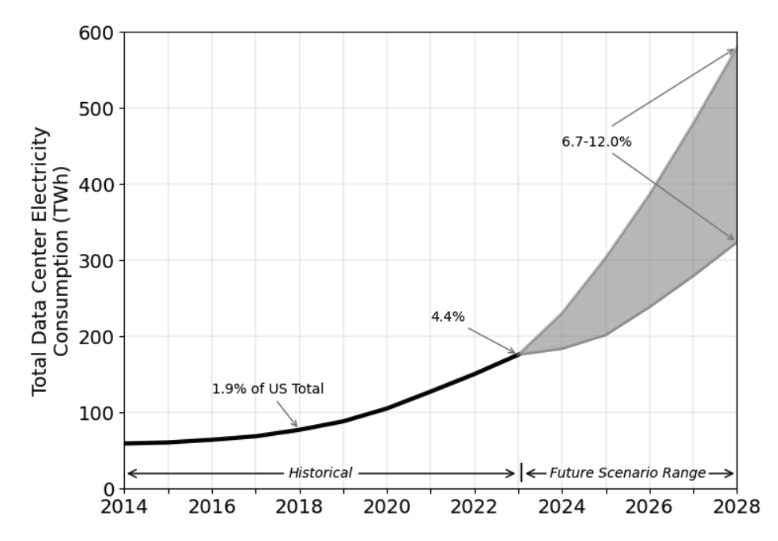
Source: eScholarship
With approximately 402.74 million terabytes of data every day, this surge demands not just more storage, but a smarter and more sustainable solution for managing and reusing IT equipment.
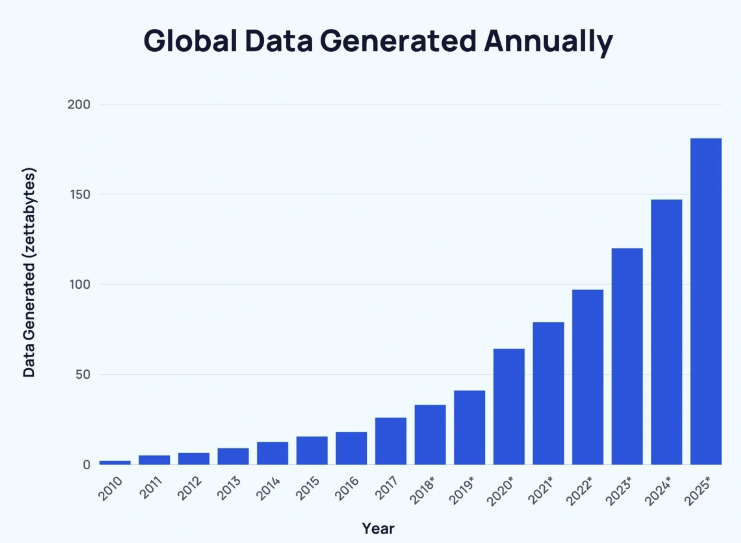
Source: Exploding Topics
In this guide, you’ll learn the smartest shopping strategies for hard drives, covering new retailers, manufacturer stores, and how specialized used IT equipment providers such as We Buy Used IT Equipment offer top-tier value.
At We Buy Used IT Equipment, we help individuals and businesses find rigorously tested, cost-effective storage hardware, from internal enterprise drives to external laptop backups, with confidence and clarity.
Understanding Hard Drives: Types & Considerations
- Internal drives are designed to be installed inside a desktop, laptop, server, or NAS, connecting via SATA, NVMe, or SAS—ideal for system storage or performance-critical computer applications.
- External drives are portable hard drives or SSDs in enclosures, connecting over USB or Thunderbolt—perfect for backups, extra storage, or carrying around your media or favorite titles.
Now, let’s compare the core storage types:
| Features | HDD | SSD |
| Speed | 30–150 MB/s; access times of 2–12 ms | 500–3500 MB/s; access <0.1 ms; 10–20x faster |
| Durability | Mechanical parts are prone to wear | No moving parts—more resistant |
| Cost/GB | Very affordable | Higher price, often 4–9x per GB |
| Best for | Bulk file storage, business backups, PC archives | Operating systems, creative apps, gaming, and multimedia purposes. |
Key Specifications to Consider
When picking a drive, focus on:
- Capacity: Measured in GB or TB, depending on your data storage requirements.
- Form Factor: 2.5” (laptops), 3.5” (desktops), or compact formats like M.2/U.2—essential to match your device.
- Interface: SATA is a standard, NVMe offers ultra-fast PCIe performance, and SAS is typically used in enterprise settings.
- Speed: HDDs are rated by RPM (e.g., 7200 RPM); SSDs by peak read/write speed and IOPS.
- Compatibility: Check whether a drive will work with your desktop, laptop, server, or NAS.
Where to Buy a Hard Drive: Exploring Your Options
New Retailers and E-tailers
Pros: With retailers and E-tailers, such as Amazon, Best Buy, Newegg, Micro Center, etc., who sell brand-new drives, you’ll find the newest hard drives, full manufacturer warranty, vast selection, plus fast shipping and easy orders.
Cons: These platforms often list at the highest price point, and the premium you’re paying rarely translates to long-term value. Electronics like HDDs and SSDs can depreciate 30–60% (depending on usage) within the first year, much like buying a new device.
Additionally, the abundance of third-party affiliates on these platforms introduces risks of counterfeit or poorly handled returns, especially when shopping for discounted items. Product rights and support may also vary drastically depending on the seller, and return logs can be frustratingly vague or slow-moving.
Best for: Those after the absolute latest tech, new brands like Western Digital or Toshiba, and those who have a larger budget to match.
Direct from Manufacturers
Pros: Buying directly from PC component manufacturers, such as Western Digital, Samsung, and Toshiba, ensures guaranteed authenticity, direct support, and access to exclusive models.
Cons: You’ll be locked into a single brand’s ecosystem, limiting your flexibility if you’re looking to compare multiple models or configurations. Pricing is often no better than big-box retailers, and promotions tend to favor bulk business purchases or specific geographic country restrictions.
Additionally, delivery times may be longer, particularly for made-to-order or specialty product lines, and warranty servicing can involve cumbersome return-to-manufacturer (RMA) procedures.
Specialized Used IT Equipment Providers
Here’s where the real value lies, especially for savvy businesses and customers:
- Significant Cost Savings: Gain access to enterprise-grade hard drives at a fraction of the cost of new ones. This is ideal for large-scale set upgrades, office refreshes, or stocking backup drives for your mission-critical data environments.
- Rigorous Testing and Refurbishment: Unlike retail outlets, we put every drive through multi-stage diagnostics, including health checks, bad-sector scans, speed tests, and performance evaluations, so you’re never left guessing about the results or drive integrity.
- Reliability and Warranty: Our used and refurbished products come with comprehensive warranty coverage. Whether you’re buying a single piece or a dozen drives, we make sure they’re covered, no DOA surprises.
- Sustainable Choice: By choosing refurbished new, you’re contributing to reduced e-waste and smarter CPU recycling. It’s a more environmentally responsible approach to data storage that still meets your performance needs.
- Access to Legacy/Specialized Drives: Need an older internal SAS HDD, a niche enterprise SSD, or a specific drive that fits into a discontinued server or custom computer setup? We often source hard-to-find legacy drives that are not available through retail stores or manufacturers.
- Expert Support: Our team of experts works with you one-on-one, verifying compatibility, sharing real-world performance metrics, and helping you connect the right solution to your existing infrastructure or workload demands.
- Data Wiping Assurance: Every drive we sell has been through certified data erasure, performed to industry standards. Our certified wiping process gives you peace of mind, especially when creatives, financial teams, or IT security professionals need secure drives for reuse or resale.
Key Checks Before You Buy a Hard Drive (Regardless of Source):
Before clicking on “add to cart”, here are a few elements you should take into consideration:
Compatibility
Confirm the drive fits both physically and electronically. Check the form factor (2.5” for laptop, 3.5” for desktop, or compact M.2/U.2 for performance rigs). Also, verify that the interface (SATA, NVMe, SAS) is compatible with your computer, NAS, or server setup.
Performing this simple check prevents wasted time; you wouldn’t want a dead-end shopping result after the shipment has been made.
Warranty
Look closely at what’s covered. Retail models often come with 3-5 year manufacturer warranties, while refurbished hard drives may offer coverage of 90 days to one year, depending on the type of equipment.
Make sure you ask for the procedure to get support or a replacement in case something goes wrong.
Vendor Reputation
Check for reviews, customer testimonials, and third-party ratings of the vendor. Reputable sites showcase their track record. Make sure they’re not hiding too many anonymous affiliates. Hearing from businesses and professional IT teams adds real credibility.
Return Policy
Faults occur once in a while; they’re inevitable. Ensure you select a vendor that allows hassle-free returns within a reasonable timeframe (typically 30 days). Pay attention to return shipping, especially if you’re in the countryside or outside the country where the sale happened.
SMART Data (for Used Drives)
Self-Monitoring, Analysis, and Reporting Technology (S.M.A.R.T.) is a built-in system that monitors drive health and predicts failures. Drives with early SMART errors are more likely to fail during the early days, so always request full SMART logs when buying used IT Equipment.
It’s one of the best ways to avoid hidden issues lurking behind shiny casings.
Refurbishment Process (for Used Drives)
If you go with refurbished gear, ask:
- Was each drive fully tested (health, performance, bad sectors)?
- Was the data wiped securely and certified?
- Are there documented benchmarks/logs to back up a reliability claim?
At We Buy Used IT Equipment, every refurbished HDD and SSD is certified, tested, and wiped as per ISO 9001, ISO 14001, R2, NAID AAA, NIST 800-88, and e-Steward standards, providing confidence that the product quality matches what you’d expect from a new drive.
Why Choose We Buy Used IT Equipment for Your Hard Drive Needs?
When you invest in a drive from We Buy Used IT Equipment, you’re choosing more than just a storage device; you’re choosing peace of mind, performance, and sustainable practices.
Quality You Can Trust
Each hard drive and SSD undergoes our multi-point testing process, covering health diagnostics, bad-sector scans, firmware updates, and performance benchmarking. Drives that don’t meet our strict standards are repaired or replaced before they ever reach you.
Exceptional Value
Why pay full price when our refurbished enterprise-grade drives offer the same reliability at a fraction of the cost? With savings up to 50–70%, you can invest more in other parts of your business or IT ecosystem, without sacrificing performance.
Expert Guidance
Not sure which drive is compatible with your setup? Our team is here to help—from internal upgrades to laptop, PC, server, or NAS environments. We consider your use case, whether it’s for games, creatives, or backup, and provide tailored results and recommendations.
Sustainable Solution
Choosing refurbished supports responsible CPU recycling and reduces e-waste. Producing a new hard drive can use 85% more energy than refurbishing one, so you’re making an eco-smart choice too.
Peace of Mind With Warranty
Every product comes with robust warranty coverage, ranging from 90 days to one year, depending on the device. No hidden clause, no hassle; if something goes wrong, we’re here to help.
Making a Smart Hard Drive Purchase
Finding the right storage solution isn’t just about shopping for the latest tech; it’s about understanding your needs, your budget, and your long-term goals.
New drives might come with flashy packaging and warranties, but they also come at a premium price. On the other hand, used and refurbished hard drives from trusted providers offer real value, real performance, and real sustainability, if you know what you’re looking for.
At We Buy Used IT Equipment, we combine exceptional value, enterprise-grade quality, and environmental responsibility. Our multi-point tested drives are ideal for a wide range of applications, from internal PC upgrades to large-scale business deployments.
Don’t compromise on data storage. Explore our wide selection of rigorously tested hard drives and other IT equipment today, or get in touch for expert advice.