Skip to content
Facebook Instagram X-twitter Youtube Linkedin

West Coast: (800) 700-7683 — East Coast: (800) 821-1782 — 9033 9th St. Rancho Cucamonga, CA 91730

We Buy Used IT Equipment

Powered By DES

  • Sell Your Equipment
    • Servers
      • Cisco
      • Dell
      • IBM
      • HP
      • Lenovo
      • SuperMicro
    • Backup Tapes
      • LTO Tapes
        • LTO10
        • LTO9
        • LTO8
        • LTO7
        • LTO6
        • LTO5
        • LTO4
        • LTO3
        • LTO Cleaning Tape
      • 3592 Tapes
        • 3592 JK
        • 3592 JE
        • 3592 JD
        • 3592 JC
        • 3592 JB
        • 3592 JA
      • T10k T2 Tapes
      • MLR/SLR Tapes
        • IBM MLR1 SLR32
        • Imation SLR32
        • Sony SLR5
        • Tandberg SLR
        • MLR/SLR Cleaning Tape
      • 4mm Tapes
        • DDS7 – DAT320
        • DDS6 – DAT160
        • DDS5 – DAT72
        • DDS4 – DAT40
      • 8mm VXA Tapes
    • Data Storage
      • Hard Drives
        • HGST
        • Hitachi
        • HP
        • IBM
        • Kingston
        • Samsung
        • Seagate
        • Toshiba
        • Western Digital
      • Storage Arrays
    • Networking
      • Routers
      • Switches
    • VoIP and Telecom
    • Memory
      • Server Memory
      • Laptop Memory
      • Desktop Memory
      • DDR3
      • DDR4
      • DDR5
    • CPUs and Processors
      • Intel Core
      • Intel Xeon
      • AMD
    • Laptops
      • Apple
      • Asus
      • Dell
      • HP
      • IBM Lenovo
      • Samsung
      • Toshiba
    • Tape Drives and Libraries
    • SFP Transceivers
      • Cisco SFP Transceivers
      • HPE SFP Transceivers
    • Scrap Electronics
    • Submit Your List
  • Services
    • Secure IT Asset Disposition
      • Secure Shipping
    • Data Center Services
      • Takeouts
      • Relocation
      • Liquidation
      • Other On-Site Services
    • Data Destruction
      • Data Destruction Compliance
        • Certificate of Data Destruction
        • Physical Data Destruction
        • Permanent Data Erasure
        • Magnetic Degaussing
      • Data Tape Erasure
      • Hard Drive Disposition
        • Hard Drive Sanitization
    • Electronics Recycling
    • Global Advantage Partner
    • Donate to Charity
  • Buy Equipment
    • Backup Tape
    • Data Center Equipment
    • New Equipment
    • Refurbished Equipment
      • Refurbished Servers
    • Warranty Information
  • Lifecycle & Sustainability
    • Lifecycle Services
      • Secure IT Asset Disposition
      • Electronics Recycling
      • Donate IT Equipment to Charity
      • Our ITAD Process
      • Secure Equipment Shipping
    • Resources
      • IT Equipment Recycling
      • E Waste Recycling
      • IT Asset Disposition Guide
      • Data Center Decommissioning
      • Comprehensive Guide to ITAD
      • Guide to Donating IT Equipment to Charity
  • Blog
  • About Us
    • Contact Us
    • Our Processes
    • ITAD White Paper
    • Newsletter
    • References
    • Privacy Policy
    • FAQ
    • Sitemap
  • Get A Quote
  • Sell Your Equipment
    • Servers
      • Cisco
      • Dell
      • IBM
      • HP
      • Lenovo
      • SuperMicro
    • Backup Tapes
      • LTO Tapes
        • LTO10
        • LTO9
        • LTO8
        • LTO7
        • LTO6
        • LTO5
        • LTO4
        • LTO3
        • LTO Cleaning Tape
      • 3592 Tapes
        • 3592 JK
        • 3592 JE
        • 3592 JD
        • 3592 JC
        • 3592 JB
        • 3592 JA
      • T10k T2 Tapes
      • MLR/SLR Tapes
        • IBM MLR1 SLR32
        • Imation SLR32
        • Sony SLR5
        • Tandberg SLR
        • MLR/SLR Cleaning Tape
      • 4mm Tapes
        • DDS7 – DAT320
        • DDS6 – DAT160
        • DDS5 – DAT72
        • DDS4 – DAT40
      • 8mm VXA Tapes
    • Data Storage
      • Hard Drives
        • HGST
        • Hitachi
        • HP
        • IBM
        • Kingston
        • Samsung
        • Seagate
        • Toshiba
        • Western Digital
      • Storage Arrays
    • Networking
      • Routers
      • Switches
    • VoIP and Telecom
    • Memory
      • Server Memory
      • Laptop Memory
      • Desktop Memory
      • DDR3
      • DDR4
      • DDR5
    • CPUs and Processors
      • Intel Core
      • Intel Xeon
      • AMD
    • Laptops
      • Apple
      • Asus
      • Dell
      • HP
      • IBM Lenovo
      • Samsung
      • Toshiba
    • Tape Drives and Libraries
    • SFP Transceivers
      • Cisco SFP Transceivers
      • HPE SFP Transceivers
    • Scrap Electronics
    • Submit Your List
  • Services
    • Secure IT Asset Disposition
      • Secure Shipping
    • Data Center Services
      • Takeouts
      • Relocation
      • Liquidation
      • Other On-Site Services
    • Data Destruction
      • Data Destruction Compliance
        • Certificate of Data Destruction
        • Physical Data Destruction
        • Permanent Data Erasure
        • Magnetic Degaussing
      • Data Tape Erasure
      • Hard Drive Disposition
        • Hard Drive Sanitization
    • Electronics Recycling
    • Global Advantage Partner
    • Donate to Charity
  • Buy Equipment
    • Backup Tape
    • Data Center Equipment
    • New Equipment
    • Refurbished Equipment
      • Refurbished Servers
    • Warranty Information
  • Lifecycle & Sustainability
    • Lifecycle Services
      • Secure IT Asset Disposition
      • Electronics Recycling
      • Donate IT Equipment to Charity
      • Our ITAD Process
      • Secure Equipment Shipping
    • Resources
      • IT Equipment Recycling
      • E Waste Recycling
      • IT Asset Disposition Guide
      • Data Center Decommissioning
      • Comprehensive Guide to ITAD
      • Guide to Donating IT Equipment to Charity
  • Blog
  • About Us
    • Contact Us
    • Our Processes
    • ITAD White Paper
    • Newsletter
    • References
    • Privacy Policy
    • FAQ
    • Sitemap
  • Get A Quote

How to Recycle Old Graphics Cards

Gaming, Graphics Card
  • Alex
  • June 21, 2022
  • 3:28 pm
Browse:
Home Gaming How to Recycle Old Graphics Cards

It’s no secret that our planet is in trouble. With increasing awareness of the dangers of global warming and pollution, many people are looking to do their part in helping to save the planet. One way to help reduce waste and help the environment is by recycling old graphic cards. In this article, we will explain how to recycle old graphic cards and help you get started.

What is a Graphic Card?

A graphic card is a piece of hardware that helps your computer to process images and videos.

Graphic cards come in different shapes and sizes, but all of them share one common feature: a surface on which you can place graphics data. That data is then processed by the graphic card and sent to your computer’s main processor.

Graphics cards are small, computer chips that help make a computer’s graphical interface look pretty. They’re also used to process graphics commands and data. Old graphic cards can be recycled into new ones, but it’s important to do it properly to avoid damaging the card or the recycling process.

A graphic card is the main component of a computer system that handles graphics and video. The card contains a processor, memory, and connectors for other components of the computer. Graphics cards are used for tasks such as displaying images on the screen, playing video games or rendering 3D models.

A graphic card is a small, rectangular chip that helps your computer create images and videos. When you upgrade your computer, you likely have to recycle your old graphic cards.

https://youtu.be/oT8WmDU4yhU

What are the different parts of a graphic card?

A graphic card is the heart of your computer system. It contains the circuitry that allows your computer to display images, graphics, and videos. These days, graphics cards are often used in gaming laptops and desktop computers. The graphics card may also contain a processor, memory, and a cooling system.

Some graphic cards have a dedicated video output that allows you to connect them to a monitor or television. Other graphic cards have an HDMI output that allows you to connect them directly to a TV.

Types of graphic cards and their recycling options

There are many types of graphic cards, so it can be hard to know which one to recycle. Here is a list of the most common types of graphic cards and their recycling options:

1. Graphics cards used in gaming:

These typically have high graphics performance and are not meant for general use. Many gaming graphics cards can be recycled using specialized recycling facilities.

2. Graphics cards used for photo and video editing:

These cards often feature high-resolution images and videos and are designed for professional use. They can be recycled using standard recycling processes but may be damaged in the process. Some photo and video editing graphics card manufacturers offer specific recycling programs for their products.

3. Graphics cards used in scientific or industrial applications:

These cards have complex circuitry that is difficult to recycle using standard recycling processes. Specialized recycling companies may be able to process these types of graphics cards, but they may be more expensive than other types of graphics cards.

4. Graphics cards with integrated graphics:

These cards typically have low graphics performance and are used in devices like laptops and tablets. They may be recycled using standard recycling processes but may be damaged in the process.
Benefits of recycling graphic cards

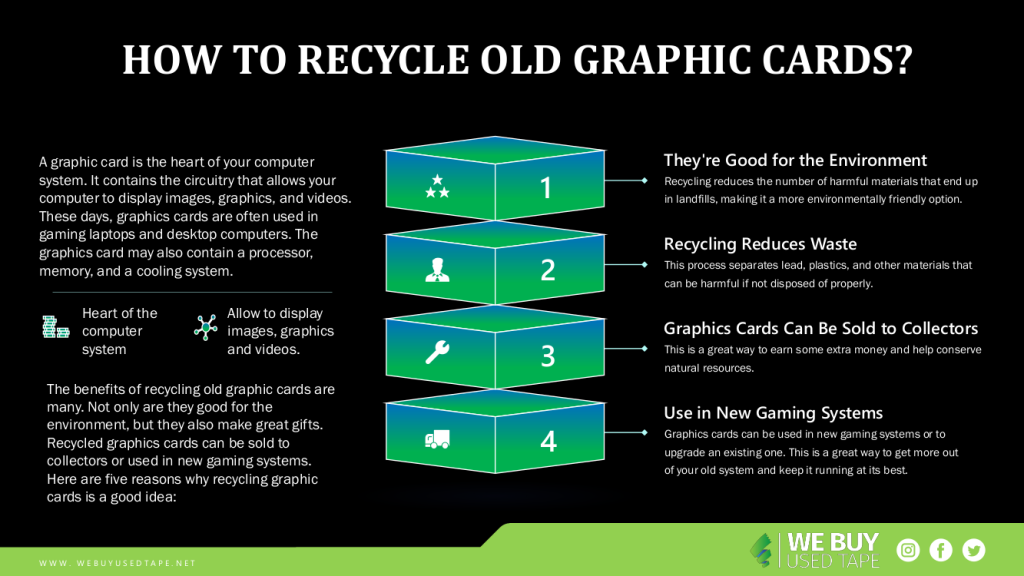
The benefits of recycling old graphic cards are many. Not only are they good for the environment, but they also make great gifts. Recycled graphics cards can be sold to collectors or used in new gaming systems. Here are five reasons why recycling graphic cards is a good idea:

1. They’re Good for the Environment

Graphic cards contain materials that can be harmful if not disposed of properly. Manufacturing processes release hazardous chemicals into the environment, and discarded graphic cards contain lead and other heavy metals that can pollute soil and water supplies. Recycling reduces the number of harmful materials that end up in landfills, making it a more environmentally friendly option.

2. Recycling Reduces Waste

Recycling graphic cards help reduce the amount of waste that goes into landfills. When graphic cards are recycled, they are broken down into their parts. This process separates lead, plastics, and other materials that can be harmful if not disposed of properly.

3. Graphics Cards Can Be Sold to Collectors

Graphics cards can be sold to collectors who love to play video games or watch movies on their computer screens. This is a great way to earn some extra money and help conserve natural resources.

4. Graphics Cards can be used in New Gaming Systems

Graphics cards can be used in new gaming systems or to upgrade an existing one. This is a great way to get more out of your old system and keep it running at its best.

https://youtu.be/7MAPyjp_-tU

How to recycle a graphic card?

You will need to determine if the card works at all. Many older graphic cards use proprietary hardware and software that may not be compatible with current computer systems. If the card does work, the next step is to remove any old hardware or software from the card. This includes any chips, connectors, or wires. Once everything has been removed, you can start recycling the card.

If you’ve got an old graphics card lying around that you no longer need, there are a few things you can do to recycle it. 

The first thing to consider is your local recycling center. They will likely have a program specifically for graphics cards. They will usually strip the card of its metal and plastic components and sell them as separate parts. 

Next, if you don’t have access to a recycling center, you can try to find someone who will take the card off your hands. There are often individuals or businesses that deal in recycled materials who would be interested in taking on a graphics card.

Finally, if none of those options work for you, you can try to sell the card online. Some websites specialize in selling used electronics and graphics cards are often popular items on these websites.

Donate your old graphic card to a charity that recycles electronics. Many charities have partners who will accept old graphic cards, and they will often give you a tax deduction for donating them.

If you have any questions about recycling your old graphic card, please contact your local recycling facility or your computer manufacturer.

There are different ways to recycle graphic cards, but the most common is called automated metal recycling (AMR). This process uses a robot to cut the card into small pieces and then smelts them down into metals. The metals are melted down and poured into molds, which create new graphic cards.

Whatever you do with your recycled graphics card, make sure to recycle everything including the packaging!

Conclusion

There are several ways to recycle a graphic card, but the most environmentally friendly option is to send it to a recycling center. Many recycling centers will also accept old graphics cards for free or for a small fee.

If you’re looking to recycle an old graphic card, there are a few things you need to know. First, make sure the card is in good condition. Second, contact the manufacturer of your graphics card to see if they have a recycling program. Third, follow the instructions that come with your recycling program. Finally, ship the card to the recycling center so that they can properly process it.

Browse:
Home Gaming How to Recycle Old Graphics Cards

Get A Quote

Fill our form here
PrevPreviousWhat Is Causing the Global Chip Shortage in 2022?
NextWhat Are Types of Network Security Protection?Next
Picture of Alex

Alex

Expertise With over 15 years of experience in marketing and business development, Alex is a seasoned strategist in digital marketing, content creation, and brand growth, Ge has grown as a trusted voice in the technology and business sectors over the past decade. Education Alex holds a Master’s degree in Entrepreneurship and dual Bachelor’s degrees in Marketing and Entrepreneurial Management from California State University - San Bernardino. Experience Alex has led high-impact initiatives that have driven significant revenue growth, brand expansion, and customer engagement. His work includes managing e-commerce operations, optimizing digital advertising strategies, and developing content that educates and informs professionals about technology and business trends. Outside of Work Beyond his professional endeavors, Alex enjoys staying active and spending quality time with family.
All Posts

Client
Testimonials

“The buyback program was easy for me to use. I simply sent WEBUY an email with the list of surplus items that I had. WEBUY replied back with a quoted value. I then shipped WBUY the tapes and quickly received payment. The process was very easy and I felt good that I wasn’t throwing the equipment into the landfill and someone else can make use of them.

I will do business with WBUY again.”

Bay Industries Inc.

“I have to say once I found you the process was relatively quick and straightforward. Your website provided great details and once I submitted my inventory within 24 hours I had a quote and confirmation of the dollar amount.

The entire process from shipment to check in hand was painless and quick, I will most definitely use this service again and have already recommended it to my other peers.”

Masons of California

Subscribe to our newsletter

Your inbox deserves better. Sign up for regular updates, insights, and deals!

  • Sorry, this service is unavailable in your country.

  • Should be Empty:
Visit Us
  • 9th St. Rancho Cucamonga, CA 91730
  • West Coast: (800) 700-7683
  • East Coast: (800) 821-1782
  • Local: (909) 466-7680
We Buy Used IT Equipment

Powered By DES

Facebook Instagram X-twitter Youtube Linkedin
BUY EQUIPMENT
  • Backup Tape
  • New Equipment
  • Refurbished Equipment
  • Warranty Info
  • Backup Tape
  • New Equipment
  • Refurbished Equipment
  • Warranty Info
SELL EQUIPMENT
  • Servers
  • Backup Tape
  • Removable Storage
  • Telecom & VOIP
  • Networking & Switches
  • Memory
  • CPUs and Processors
  • Laptops
  • Tape Drives
  • SFP Transceivers
  • Scrap Electronics
  • Servers
  • Backup Tape
  • Removable Storage
  • Telecom & VOIP
  • Networking & Switches
  • Memory
  • CPUs and Processors
  • Laptops
  • Tape Drives
  • SFP Transceivers
  • Scrap Electronics
SERVICES
  • IT Asset Disposition
  • Data Destruction
  • Data Center Services
  • Secure Shipping
  • Donate Your Assets
  • International Sales
  • Onsite Services
  • Electronics Recycle
  • IT Asset Disposition
  • Data Destruction
  • Data Center Services
  • Secure Shipping
  • Donate Your Assets
  • International Sales
  • Onsite Services
  • Electronics Recycle
STAY INFORMED
  • Blog
  • About Us
  • Contact Us
  • Our Process
  • FAQ
  • Sitemap
  • Blog
  • About Us
  • Contact Us
  • Our Process
  • FAQ
  • Sitemap

© 2026 All Rights Reserved. Website created with ❤ by mrrssy.

Skip to content
Open toolbar Accessibility Tools

Accessibility Tools

  • Increase TextIncrease Text
  • Decrease TextDecrease Text
  • GrayscaleGrayscale
  • High ContrastHigh Contrast
  • Negative ContrastNegative Contrast
  • Light BackgroundLight Background
  • Links UnderlineLinks Underline
  • Readable FontReadable Font
  • Reset Reset
  • SitemapSitemap
  • FeedbackFeedback