Skip to content
Facebook Instagram X-twitter Youtube Linkedin

West Coast: (800) 700-7683 — East Coast: (800) 821-1782 — 9033 9th St. Rancho Cucamonga, CA 91730

We Buy Used IT Equipment
Powered By DES
  • Sell Your Equipment
    • Servers
      • Cisco
      • Dell
      • IBM
      • HP
      • Lenovo
      • SuperMicro
    • Backup Tapes
      • LTO Tapes
        • LTO10
        • LTO9
        • LTO8
        • LTO7
        • LTO6
        • LTO5
        • LTO4
        • LTO3
        • LTO Cleaning Tape
      • 3592 Tapes
        • 3592 JK
        • 3592 JE
        • 3592 JD
        • 3592 JC
        • 3592 JB
        • 3592 JA
      • T10k T2 Tapes
      • MLR/SLR Tapes
        • IBM MLR1 SLR32
        • Imation SLR32
        • Sony SLR5
        • Tandberg SLR
        • MLR/SLR Cleaning Tape
      • 4mm Tapes
        • DDS7 – DAT320
        • DDS6 – DAT160
        • DDS5 – DAT72
        • DDS4 – DAT40
      • 8mm VXA Tapes
    • Data Storage
      • Hard Drives
        • HGST
        • Hitachi
        • HP
        • IBM
        • Kingston
        • Samsung
        • Seagate
        • Toshiba
        • Western Digital
      • Storage Arrays
    • Networking
      • Routers
      • Switches
    • VoIP and Telecom
    • Memory
      • Server Memory
      • Laptop Memory
      • Desktop Memory
      • DDR3
      • DDR4
      • DDR5
    • CPUs and Processors
      • Intel Core
      • Intel Xeon
      • AMD
    • Laptops
      • Apple
      • Asus
      • Dell
      • HP
      • IBM Lenovo
      • Samsung
      • Toshiba
    • Tape Drives and Libraries
    • SFP Transceivers
      • Cisco SFP Transceivers
      • HPE SFP Transceivers
    • Scrap Electronics
    • Submit Your List
  • Services
    • Secure IT Asset Disposition
      • Secure Shipping
    • Data Center Services
      • Takeouts
      • Relocation
      • Liquidation
      • Other On-Site Services
    • Data Destruction
      • Data Destruction Compliance
        • Certificate of Data Destruction
        • Physical Data Destruction
        • Permanent Data Erasure
        • Magnetic Degaussing
      • Data Tape Erasure
      • Hard Drive Disposition
        • Hard Drive Sanitization
    • Electronics Recycling
    • Global Advantage Partner
    • Donate to Charity
  • Buy Equipment
    • Backup Tape
    • Data Center Equipment
    • New Equipment
    • Refurbished Equipment
      • Refurbished Servers
    • Warranty Information
  • Lifecycle & Sustainability
    • Lifecycle Services
      • Secure IT Asset Disposition
      • Electronics Recycling
      • Donate IT Equipment to Charity
      • Our ITAD Process
      • Secure Equipment Shipping
    • Resources
      • IT Equipment Recycling
      • E Waste Recycling
      • IT Asset Disposition Guide
      • Data Center Decommissioning
      • Comprehensive Guide to ITAD
      • Guide to Donating IT Equipment to Charity
  • Blog
  • About Us
    • Contact Us
    • Our Processes
    • ITAD White Paper
    • Newsletter
    • References
    • Privacy Policy
    • FAQ
    • Sitemap
  • Get A Quote
  • Sell Your Equipment
    • Servers
      • Cisco
      • Dell
      • IBM
      • HP
      • Lenovo
      • SuperMicro
    • Backup Tapes
      • LTO Tapes
        • LTO10
        • LTO9
        • LTO8
        • LTO7
        • LTO6
        • LTO5
        • LTO4
        • LTO3
        • LTO Cleaning Tape
      • 3592 Tapes
        • 3592 JK
        • 3592 JE
        • 3592 JD
        • 3592 JC
        • 3592 JB
        • 3592 JA
      • T10k T2 Tapes
      • MLR/SLR Tapes
        • IBM MLR1 SLR32
        • Imation SLR32
        • Sony SLR5
        • Tandberg SLR
        • MLR/SLR Cleaning Tape
      • 4mm Tapes
        • DDS7 – DAT320
        • DDS6 – DAT160
        • DDS5 – DAT72
        • DDS4 – DAT40
      • 8mm VXA Tapes
    • Data Storage
      • Hard Drives
        • HGST
        • Hitachi
        • HP
        • IBM
        • Kingston
        • Samsung
        • Seagate
        • Toshiba
        • Western Digital
      • Storage Arrays
    • Networking
      • Routers
      • Switches
    • VoIP and Telecom
    • Memory
      • Server Memory
      • Laptop Memory
      • Desktop Memory
      • DDR3
      • DDR4
      • DDR5
    • CPUs and Processors
      • Intel Core
      • Intel Xeon
      • AMD
    • Laptops
      • Apple
      • Asus
      • Dell
      • HP
      • IBM Lenovo
      • Samsung
      • Toshiba
    • Tape Drives and Libraries
    • SFP Transceivers
      • Cisco SFP Transceivers
      • HPE SFP Transceivers
    • Scrap Electronics
    • Submit Your List
  • Services
    • Secure IT Asset Disposition
      • Secure Shipping
    • Data Center Services
      • Takeouts
      • Relocation
      • Liquidation
      • Other On-Site Services
    • Data Destruction
      • Data Destruction Compliance
        • Certificate of Data Destruction
        • Physical Data Destruction
        • Permanent Data Erasure
        • Magnetic Degaussing
      • Data Tape Erasure
      • Hard Drive Disposition
        • Hard Drive Sanitization
    • Electronics Recycling
    • Global Advantage Partner
    • Donate to Charity
  • Buy Equipment
    • Backup Tape
    • Data Center Equipment
    • New Equipment
    • Refurbished Equipment
      • Refurbished Servers
    • Warranty Information
  • Lifecycle & Sustainability
    • Lifecycle Services
      • Secure IT Asset Disposition
      • Electronics Recycling
      • Donate IT Equipment to Charity
      • Our ITAD Process
      • Secure Equipment Shipping
    • Resources
      • IT Equipment Recycling
      • E Waste Recycling
      • IT Asset Disposition Guide
      • Data Center Decommissioning
      • Comprehensive Guide to ITAD
      • Guide to Donating IT Equipment to Charity
  • Blog
  • About Us
    • Contact Us
    • Our Processes
    • ITAD White Paper
    • Newsletter
    • References
    • Privacy Policy
    • FAQ
    • Sitemap
  • Get A Quote

Which memory types are most commonly found in servers?

Memory, Servers
  • Steven
  • November 18, 2023
  • 11:55 am
Browse:
Home Memory Which memory types are most commonly found in servers?

In the ever-evolving landscape of server technology, the type of memory employed plays a pivotal role in determining performance, efficiency, and overall capabilities. As organizations strive to meet the escalating demands of data processing and storage, understanding the nuances of server memory becomes crucial. In this comprehensive exploration, we delve into the intricacies of server memory, with a keen focus on the most commonly found types—server memory and server RAM. Join us on a journey through the technological corridors that power the servers driving the backbone of our digital world.

The Heartbeat of Servers – Understanding Server Memory

In the realm of servers, memory serves as the heartbeat, influencing how fast and efficiently data can be accessed and processed. Server memory, commonly referred to as RAM (Random Access Memory), is the unsung hero that ensures seamless multitasking, rapid data retrieval, and overall system responsiveness. In this section, we will unravel the fundamental role of server memory, shedding light on its importance in the context of modern computing.

The Crucial Role of Server Memory in Data Processing

Server memory acts as a temporary storage space where data is swiftly loaded and processed, significantly impacting the speed at which applications and services operate. Whether it’s handling complex computations, serving web pages, or managing databases, the type and capacity of server memory directly correlate with overall system performance.
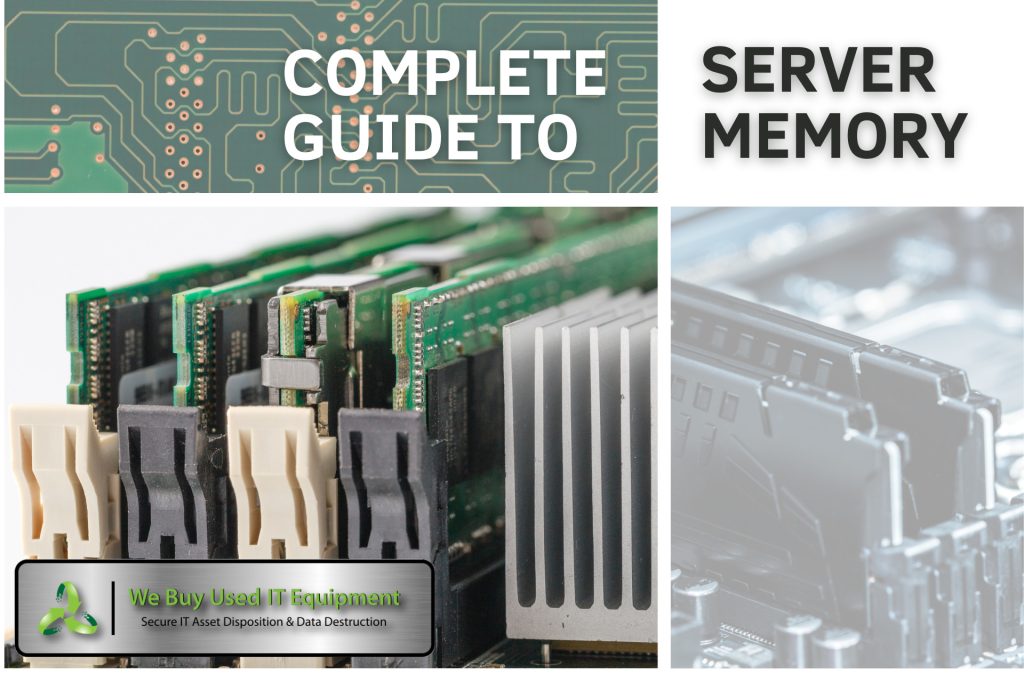
Different Types of Server Memory

As servers have evolved, so too have the types of memory employed to meet diverse computational needs. This section provides an in-depth exploration of the various server memory types commonly found in modern server configurations.

DDR4, DDR5, and the Evolution of Server RAM

Dynamic Random Access Memory (DRAM) has been a cornerstone of server memory, with DDR4 and the emerging DDR5 technologies dominating the landscape. We’ll dissect the features and capabilities of each, highlighting the advantages that these generations bring to the table in terms of speed, bandwidth, and energy efficiency. Understanding the evolution of server RAM is crucial for businesses seeking optimal performance from their server infrastructure.

DDR4 vs. DDR5 – Unraveling the Evolution of Server RAM

In the dynamic world of server technology, the evolution of server RAM (Random Access Memory) has seen significant milestones with the transition from DDR4 to DDR5. Understanding the differences between these generations is crucial for businesses aiming to harness the full potential of their server infrastructure.

DDR4: The Workhorse of Contemporary Servers

DDR4, or Double Data Rate 4, has been the workhorse of server memory in recent years. Launched as the successor to DDR3, DDR4 brought notable improvements in terms of speed, efficiency, and capacity. One of the key advancements was the increase in data transfer rates, allowing servers to handle more data at faster speeds.

Speed and Bandwidth:

DDR4 introduced higher clock speeds, with data transfer rates ranging from 2133 MT/s (million transfers per second) to 3200 MT/s and beyond. This increase in speed translated to improved bandwidth, enabling servers to process and retrieve data more swiftly.

Energy Efficiency:

In addition to speed, DDR4 incorporated advancements in energy efficiency. The introduction of a lower operating voltage compared to DDR3 resulted in reduced power consumption, a critical consideration for organizations aiming to optimize their energy usage in data centers.

Capacity:

DDR4 also brought about an increase in memory module capacity. Server configurations with larger capacities became more feasible, accommodating the escalating demands of memory-intensive applications and workloads.

DDR5: Paving the Way for the Future of Server Memory

As technology marches forward, DDR5 emerges as the next frontier in server memory, promising to push the boundaries of performance and efficiency even further.

Increased Data Transfer Rates:

One of the most notable features of DDR5 is its substantially increased data transfer rates. DDR5 operates at higher speeds compared to DDR4, with the potential to reach data transfer rates beyond 8400 MT/s. This heightened speed enhances the overall responsiveness of servers, making them better equipped to handle the demands of contemporary computing.

Enhanced Bandwidth and Density:

DDR5 also brings improvements in bandwidth and memory module density. The increased bandwidth allows for more data to be processed simultaneously, while higher-density modules enable servers to accommodate larger amounts of memory. This is particularly advantageous for applications requiring extensive datasets or virtualized environments.

Advanced Error Correction:

DDR5 introduces advancements in error correction capabilities. Enhanced error correction features contribute to improved reliability, reducing the likelihood of data corruption and enhancing the overall integrity of the server’s memory subsystem.
Key Differences: DDR4 vs. DDR5

While both DDR4 and DDR5 serve the fundamental purpose of providing volatile memory for servers, several key differences set them apart:

  1. Speed and Bandwidth:
  1. DDR5 operates at higher speeds, resulting in increased bandwidth and faster data transfer rates compared to DDR4.
  1. Energy Efficiency:
  1. DDR5 continues the trend of improving energy efficiency, contributing to lower power consumption compared to DDR4.
  1. Capacity and Density:
  1. DDR5 supports higher memory module densities, allowing for larger overall memory capacities in server configurations.
  1. Error Correction:
  1. DDR5 introduces advanced error correction features, enhancing the reliability and integrity of data stored in server memory.

Factors Influencing Server Memory Choices

Selecting the right server memory involves a careful consideration of several factors, ranging from workload requirements to budget constraints. In this section, we explore the key considerations that guide decision-makers in choosing the most suitable server memory for their specific needs.

Workload Demands and Server Memory Configuration

Different workloads impose varying demands on server memory. Whether it’s a high-traffic e-commerce website, a database-intensive application, or a virtualized server environment, the right server memory configuration is essential for achieving optimal performance. We’ll delve into real-world scenarios to illustrate how specific memory configurations align with different workload requirements.

Optimizing Server Memory for Peak Performance

The effectiveness of server memory isn’t solely determined by its type and capacity but also by how it is configured and managed. This section provides practical insights into optimizing server memory for peak performance, covering topics such as memory channels, interleaving, and advanced memory technologies.

Best Practices for Server Memory Configuration

Discover the best practices for configuring server memory to harness its full potential. From optimizing memory channels to exploring the benefits of memory interleaving, we’ll equip readers with actionable insights to ensure their server memory operates at peak efficiency.

The Ever-Expanding Horizons of Server Memory

In concluding our exploration, it’s evident that the choice and optimization of server memory are critical components in shaping the performance and capabilities of modern servers. Server memory and RAM continue to be the unsung heroes behind the scenes, empowering the servers that drive our digital world forward. As technology evolves, so too will the landscape of server memory, and staying informed about these advancements will be paramount for organizations seeking to stay at the forefront of innovation. Join us on this journey through the intricate realm of server memory and witness the transformative power it holds in shaping the future of computing.

Browse:
Home Memory Which memory types are most commonly found in servers?

Get A Quote

Fill our form here
PrevPreviousYour Complete Guide to Server RAM
NextData Center Components: From Servers to Storage, Understanding Your InfrastructureNext
Picture of Steven

Steven

Expertise: Steven is a skilled software developer and designer who’s all about creating scalable web applications. He’s got a sharp eye for detail and a love for innovation, focusing on front-end development, UX/UI design, and blending cool tech like AI and machine learning into easy-to-use interfaces. He’s also fluent in many programming languages. Education: Steven graduated with a Bachelor of Science in Computer Science from UC Berkeley, where he earned honors. While at Berkeley, he got involved with the Computer Science club and worked on a bunch of open-source projects. Experience: Steven has been shaping his career by working with start-ups and freelancing as a developer and designer. He’s been hands-on with creating cool, user-friendly solutions—everything from writing clean code to designing sleek interfaces. Freelancing has let him dive into all sorts of projects, sharpen his skills, and bring awesome ideas to life. This mix of start-up energy and freelance creativity has made Steven super adaptable and great at making things happen. Outside of Work: When Steven isn’t busy with coding, he loves spending time outdoors. He’s big on hiking and nature photography, often hitting the trails on weekends. In his downtime he is trying out new spicy food recipes, and playing the guitar.
All Posts

Client
Testimonials

“The buyback program was easy for me to use. I simply sent WEBUY an email with the list of surplus items that I had. WEBUY replied back with a quoted value. I then shipped WBUY the tapes and quickly received payment. The process was very easy and I felt good that I wasn’t throwing the equipment into the landfill and someone else can make use of them.

I will do business with WBUY again.”

Bay Industries Inc.

“I have to say once I found you the process was relatively quick and straightforward. Your website provided great details and once I submitted my inventory within 24 hours I had a quote and confirmation of the dollar amount.

The entire process from shipment to check in hand was painless and quick, I will most definitely use this service again and have already recommended it to my other peers.”

Masons of California

Subscribe to our newsletter

Your inbox deserves better. Sign up for regular updates, insights, and deals!

  • Sorry, this service is unavailable in your country.

  • Should be Empty:
Visit Us
  • 9th St. Rancho Cucamonga, CA 91730
  • West Coast: (800) 700-7683
  • East Coast: (800) 821-1782
  • Local: (909) 466-7680
We Buy Used IT Equipment

Powered By DES

Facebook Instagram X-twitter Youtube Linkedin
BUY EQUIPMENT
  • Backup Tape
  • New Equipment
  • Refurbished Equipment
  • Warranty Info
  • Backup Tape
  • New Equipment
  • Refurbished Equipment
  • Warranty Info
SELL EQUIPMENT
  • Servers
  • Backup Tape
  • Removable Storage
  • Telecom & VOIP
  • Networking & Switches
  • Memory
  • CPUs and Processors
  • Laptops
  • Tape Drives
  • SFP Transceivers
  • Scrap Electronics
  • Servers
  • Backup Tape
  • Removable Storage
  • Telecom & VOIP
  • Networking & Switches
  • Memory
  • CPUs and Processors
  • Laptops
  • Tape Drives
  • SFP Transceivers
  • Scrap Electronics
SERVICES
  • IT Asset Disposition
  • Data Destruction
  • Data Center Services
  • Secure Shipping
  • Donate Your Assets
  • International Sales
  • Onsite Services
  • Electronics Recycle
  • IT Asset Disposition
  • Data Destruction
  • Data Center Services
  • Secure Shipping
  • Donate Your Assets
  • International Sales
  • Onsite Services
  • Electronics Recycle
STAY INFORMED
  • Blog
  • About Us
  • Contact Us
  • Our Process
  • FAQ
  • Sitemap
  • Blog
  • About Us
  • Contact Us
  • Our Process
  • FAQ
  • Sitemap

© 2026 All Rights Reserved. Website created with ❤ by mrrssy.

Accessibility Adjustments

Powered by OneTap

How long do you want to hide the toolbar?
Hide Toolbar Duration
Select your accessibility profile
Vision Impaired Mode
Enhances website's visuals
Seizure Safe Profile
Clear flashes & reduces color
ADHD Friendly Mode
Focused browsing, distraction-free
Blindness Mode
Reduces distractions, improves focus
Epilepsy Safe Mode
Dims colors and stops blinking
Content Modules
Font Size

Default

Line Height

Default

Color Modules
Orientation Modules