Skip to content
Facebook Instagram X-twitter Youtube Linkedin

West Coast: (800) 700-7683 — East Coast: (800) 821-1782 — 9033 9th St. Rancho Cucamonga, CA 91730

We Buy Used IT Equipment
Powered By DES
  • Sell Your Equipment
    • Servers
      • Cisco
      • Dell
      • IBM
      • HP
      • Lenovo
      • SuperMicro
    • Backup Tapes
      • LTO Tapes
        • LTO10
        • LTO9
        • LTO8
        • LTO7
        • LTO6
        • LTO5
        • LTO4
        • LTO3
        • LTO Cleaning Tape
      • 3592 Tapes
        • 3592 JK
        • 3592 JE
        • 3592 JD
        • 3592 JC
        • 3592 JB
        • 3592 JA
      • T10k T2 Tapes
      • MLR/SLR Tapes
        • IBM MLR1 SLR32
        • Imation SLR32
        • Sony SLR5
        • Tandberg SLR
        • MLR/SLR Cleaning Tape
      • 4mm Tapes
        • DDS7 – DAT320
        • DDS6 – DAT160
        • DDS5 – DAT72
        • DDS4 – DAT40
      • 8mm VXA Tapes
    • Data Storage
      • Hard Drives
        • HGST
        • Hitachi
        • HP
        • IBM
        • Kingston
        • Samsung
        • Seagate
        • Toshiba
        • Western Digital
      • Storage Arrays
    • Networking
      • Routers
      • Switches
    • VoIP and Telecom
    • Memory
      • Server Memory
      • Laptop Memory
      • Desktop Memory
      • DDR3
      • DDR4
      • DDR5
    • CPUs and Processors
      • Intel Core
      • Intel Xeon
      • AMD
    • Laptops
      • Apple
      • Asus
      • Dell
      • HP
      • IBM Lenovo
      • Samsung
      • Toshiba
    • Tape Drives and Libraries
    • SFP Transceivers
      • Cisco SFP Transceivers
      • HPE SFP Transceivers
    • Scrap Electronics
    • Submit Your List
  • Services
    • Secure IT Asset Disposition
      • Secure Shipping
    • Data Center Services
      • Takeouts
      • Relocation
      • Liquidation
      • Other On-Site Services
    • Data Destruction
      • Data Destruction Compliance
        • Certificate of Data Destruction
        • Physical Data Destruction
        • Permanent Data Erasure
        • Magnetic Degaussing
      • Data Tape Erasure
      • Hard Drive Disposition
        • Hard Drive Sanitization
    • Electronics Recycling
    • Global Advantage Partner
    • Donate to Charity
  • Buy Equipment
    • Backup Tape
    • Data Center Equipment
    • New Equipment
    • Refurbished Equipment
      • Refurbished Servers
    • Warranty Information
  • Lifecycle & Sustainability
    • Lifecycle Services
      • Secure IT Asset Disposition
      • Electronics Recycling
      • Donate IT Equipment to Charity
      • Our ITAD Process
      • Secure Equipment Shipping
    • Resources
      • IT Equipment Recycling
      • E Waste Recycling
      • IT Asset Disposition Guide
      • Data Center Decommissioning
      • Comprehensive Guide to ITAD
      • Guide to Donating IT Equipment to Charity
  • Blog
  • About Us
    • Contact Us
    • Our Processes
    • ITAD White Paper
    • Newsletter
    • References
    • Privacy Policy
    • FAQ
    • Sitemap
  • Get A Quote
  • Sell Your Equipment
    • Servers
      • Cisco
      • Dell
      • IBM
      • HP
      • Lenovo
      • SuperMicro
    • Backup Tapes
      • LTO Tapes
        • LTO10
        • LTO9
        • LTO8
        • LTO7
        • LTO6
        • LTO5
        • LTO4
        • LTO3
        • LTO Cleaning Tape
      • 3592 Tapes
        • 3592 JK
        • 3592 JE
        • 3592 JD
        • 3592 JC
        • 3592 JB
        • 3592 JA
      • T10k T2 Tapes
      • MLR/SLR Tapes
        • IBM MLR1 SLR32
        • Imation SLR32
        • Sony SLR5
        • Tandberg SLR
        • MLR/SLR Cleaning Tape
      • 4mm Tapes
        • DDS7 – DAT320
        • DDS6 – DAT160
        • DDS5 – DAT72
        • DDS4 – DAT40
      • 8mm VXA Tapes
    • Data Storage
      • Hard Drives
        • HGST
        • Hitachi
        • HP
        • IBM
        • Kingston
        • Samsung
        • Seagate
        • Toshiba
        • Western Digital
      • Storage Arrays
    • Networking
      • Routers
      • Switches
    • VoIP and Telecom
    • Memory
      • Server Memory
      • Laptop Memory
      • Desktop Memory
      • DDR3
      • DDR4
      • DDR5
    • CPUs and Processors
      • Intel Core
      • Intel Xeon
      • AMD
    • Laptops
      • Apple
      • Asus
      • Dell
      • HP
      • IBM Lenovo
      • Samsung
      • Toshiba
    • Tape Drives and Libraries
    • SFP Transceivers
      • Cisco SFP Transceivers
      • HPE SFP Transceivers
    • Scrap Electronics
    • Submit Your List
  • Services
    • Secure IT Asset Disposition
      • Secure Shipping
    • Data Center Services
      • Takeouts
      • Relocation
      • Liquidation
      • Other On-Site Services
    • Data Destruction
      • Data Destruction Compliance
        • Certificate of Data Destruction
        • Physical Data Destruction
        • Permanent Data Erasure
        • Magnetic Degaussing
      • Data Tape Erasure
      • Hard Drive Disposition
        • Hard Drive Sanitization
    • Electronics Recycling
    • Global Advantage Partner
    • Donate to Charity
  • Buy Equipment
    • Backup Tape
    • Data Center Equipment
    • New Equipment
    • Refurbished Equipment
      • Refurbished Servers
    • Warranty Information
  • Lifecycle & Sustainability
    • Lifecycle Services
      • Secure IT Asset Disposition
      • Electronics Recycling
      • Donate IT Equipment to Charity
      • Our ITAD Process
      • Secure Equipment Shipping
    • Resources
      • IT Equipment Recycling
      • E Waste Recycling
      • IT Asset Disposition Guide
      • Data Center Decommissioning
      • Comprehensive Guide to ITAD
      • Guide to Donating IT Equipment to Charity
  • Blog
  • About Us
    • Contact Us
    • Our Processes
    • ITAD White Paper
    • Newsletter
    • References
    • Privacy Policy
    • FAQ
    • Sitemap
  • Get A Quote

What to Keep in Mind Before Decommissioning Your Data Center

Data Centers, ITAD
  • Dustin
  • September 21, 2022
  • 1:00 pm
Browse:
Home Data Centers What to Keep in Mind Before Decommissioning Your Data Center

A data center is a physical facility that organizations use to house their critical applications and data. A data center’s design is based on a network of computing and storage resources that enable the delivery of shared applications and data. The key components of a data center design include routers, switches, firewalls, storage systems, servers, and application-delivery controllers.

What is data decommissioning?

Data decommissioning is the process of permanently removing data from a system. This can be done for a variety of reasons, such as when data is no longer needed or when a system is being replaced. Decommissioning data can be a complex process, so it’s important to keep a few things in mind before beginning.

Data centers are expensive to maintain, and as technology evolves, they become outdated quickly. When you reach the point where your data center is no longer providing the level of service you need, it’s time to decommission it. Here are a few things to keep in mind when you’re ready to decommission your data center:

1. Decommissioning your data center can save you money.
2. Decommissioning your data center can help you reduce your carbon footprint.
3. Decommissioning your data center can free up space for other uses.

Weighing the pros and cons of decommissioning your data center is an important decision. Keep these benefits in mind as you make your decision.

https://youtu.be/nueIEASa1F4

When to decommission your data center?

Data centers are a critical part of any organization’s infrastructure, but they can also be expensive to maintain. As such, it’s important to know when it’s time to decommission your data center. Here are a few things to keep in mind:

-The cost of maintaining a data center can increase over time. If you find that the cost of running your data center is becoming prohibitive, it may be time to consider decommissioning it.

-If your data center is no longer meeting your needs, it may be time to consider decommissioning it. For example, if you’re no longer using certain applications or services that require a data center, there’s no reason to keep it running.

-If you’re planning to move to a new location, you may need to decommission your old data center. In some cases, it may be possible to sell or lease your old data center to another organization.

-If your data center is outdated or no longer meets industry standards, it may be time to decommission it. Depending on the age of your data center, you may not be able to upgrade it to meet current standards.

How to prepare your data center for decommissioning?

You’ll need to develop a plan for how to migrate your data and applications to a new location. This plan should take into account any dependencies between systems, and you’ll need to ensure that all data is backed up and easily accessible. By following these steps, you can decommission your data center with minimal disruption to your business:

– Notifying customers/tenants

First, you need to notify all customers or tenants that will be affected by the downtime. Secondly, you need to update all documentation associated with the data center so that everyone is on the same page. Once that is done, you need to schedule a downtime window so that all necessary work can be completed. During this time, you will also need to check power and cooling to make sure everything is working properly. Finally, you will need to migrate all data to the new location. Once that is done, you should test everything to make sure it is working as intended.

– Updating documentation

First, be sure to update all your documentation. This includes any diagrams of your current set-up, as well as any records of what equipment is housed where. This will be crucial for your team (more on that later) and for anyone who may need to reference this information down the road. It will also help troubleshoot any issues that may come up down the road.

– Scheduling downtime

Next, you’ll need to coordinate with any teams that will be affected by the decommissioning. This includes IT, of course, but also any other departments who use the data center or who will be involved in the move. Make sure everyone is on the same page and knows what their role is in the process. Work with your team to come up with a timeline that makes sense for everyone involved.
– Checking power and cooling

You need to make sure that all of your power and cooling systems are still operational. If they’re not, you could end up damaging your equipment. Second, you need to check all of your cablings. Make sure that all of the equipment is properly secured and that there are no loose cables or other hazards that could pose a tripping hazard. Also, make sure that all of the equipment is properly labeled so that you know what is going on where.

– Deleting data

First, you need to make sure that all of your data is deleted. You don’t want to leave any sensitive information behind. Second, you need to make sure that all of your equipment is properly decommissioned. You don’t want to cause any damage to your equipment or the environment. Finally, you need to make sure that you have a plan in place for decommissioning your data center. You don’t want to be left with a bunch of useless equipment.

– Environmental concerns

You will also need to take into account environmental concerns. Make sure that all of the equipment is properly protected from the elements and that you have taken care of any potential hazards. This includes making sure that there are no leaks or spills that could potentially damage the equipment.

– Logistical concerns

Finally, you will need to take into account the logistical concerns when you are decommissioning your data center. This includes making sure that all of the equipment is properly packed and shipped to its new location. You will also need to make sure that you have a plan for how you are going to dispose of any unwanted equipment.

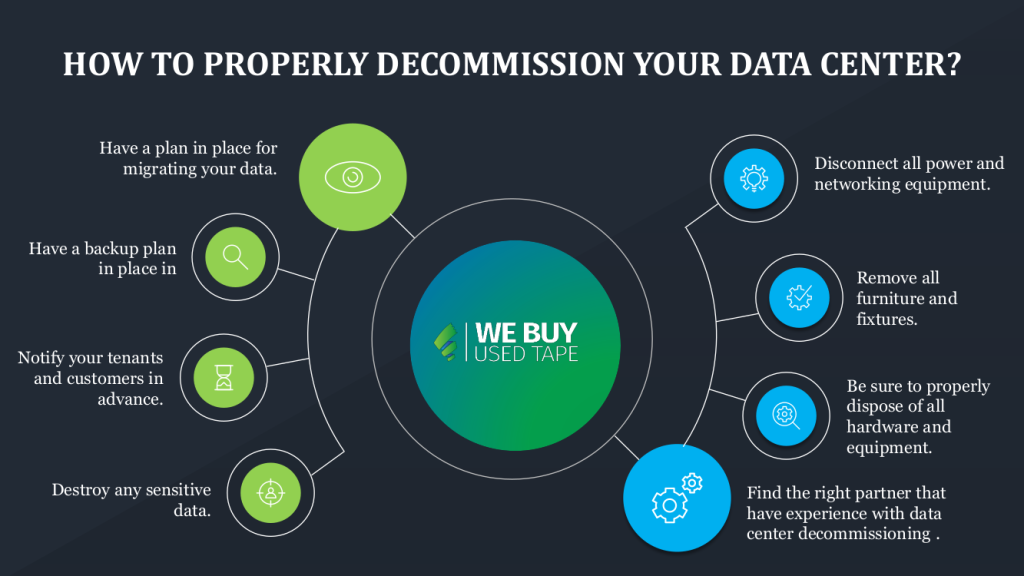
How to properly decommission your data center?

Are you decommissioning your data center? If so, there are a few things you should keep in mind to ensure a smooth transition. Here are a few tips:

1. Make sure you have a plan in place for migrating your data and applications to a new data center or cloud environment. This will ensure that your business can continue to run smoothly during the decommissioning process.

2. Make sure you have a backup plan in place in case of any unexpected issues during the decommissioning process. This could include having spare parts on hand or contracting with a backup data center provider.

3. Notify your tenants and customers in advance. Let them know about the impending decommissioning so they can make alternative arrangements for their data storage and processing needs.

4. Destroy any sensitive data. If you have any confidential or sensitive data stored in your data center, be sure to destroy it before decommissioning the facility.

5. Disconnect all power and networking equipment. Once you’ve migrated your data and destroyed any sensitive information, you can begin disconnecting and removing all of the physical infrastructures from your data center.

6. Remove all furniture and fixtures. Once the physical infrastructure is gone, you can remove any remaining furniture or fixtures from the facility.

7. Be sure to properly dispose of all hardware and equipment. This includes recycling or donating any usable equipment and disposing of hazardous materials by local regulations.

https://youtu.be/Ii40ty346Rw

How to choose the right data center decommissioning partner?

The right partner will have experience with data center decommissioning and will be able to help you navigate the process from start to finish. They’ll also be able to provide you with the resources you need to get the job done right.

Be sure to ask about their experience and qualifications. You should also ask for references from past clients. Once you’ve found a few qualified partners, be sure to get quotes from each one so that you can compare pricing.

Final Thoughts

As you prepare to dismantle your data center, there are a few final things to keep in mind. First, you’ll need to make sure that all of your data is backed up and safely stored. Secondly, you’ll need to decommission the equipment by unplugging all cables and devices, turning off any power sources, and physically removing it from the data center. You will also need to clean up the area after completing these first two steps by removing any debris or dust that has accumulated. When this final stage is completed, you’re ready to decompress your data center!

Browse:
Home Data Centers What to Keep in Mind Before Decommissioning Your Data Center

Get A Quote

Fill our form here
PrevPreviousThe Ultimate Data Migration Checklist
NextWhat to Check Before Hiring a Data Center Liquidation CompanyNext
Picture of Dustin

Dustin

All Posts

Client
Testimonials

“The buyback program was easy for me to use. I simply sent WEBUY an email with the list of surplus items that I had. WEBUY replied back with a quoted value. I then shipped WBUY the tapes and quickly received payment. The process was very easy and I felt good that I wasn’t throwing the equipment into the landfill and someone else can make use of them.

I will do business with WBUY again.”

Bay Industries Inc.

“I have to say once I found you the process was relatively quick and straightforward. Your website provided great details and once I submitted my inventory within 24 hours I had a quote and confirmation of the dollar amount.

The entire process from shipment to check in hand was painless and quick, I will most definitely use this service again and have already recommended it to my other peers.”

Masons of California

Subscribe to our newsletter

Your inbox deserves better. Sign up for regular updates, insights, and deals!

  • Sorry, this service is unavailable in your country.

  • Should be Empty:
Visit Us
  • 9th St. Rancho Cucamonga, CA 91730
  • West Coast: (800) 700-7683
  • East Coast: (800) 821-1782
  • Local: (909) 466-7680
We Buy Used IT Equipment

Powered By DES

Facebook Instagram X-twitter Youtube Linkedin
BUY EQUIPMENT
  • Backup Tape
  • New Equipment
  • Refurbished Equipment
  • Warranty Info
  • Backup Tape
  • New Equipment
  • Refurbished Equipment
  • Warranty Info
SELL EQUIPMENT
  • Servers
  • Backup Tape
  • Removable Storage
  • Telecom & VOIP
  • Networking & Switches
  • Memory
  • CPUs and Processors
  • Laptops
  • Tape Drives
  • SFP Transceivers
  • Scrap Electronics
  • Servers
  • Backup Tape
  • Removable Storage
  • Telecom & VOIP
  • Networking & Switches
  • Memory
  • CPUs and Processors
  • Laptops
  • Tape Drives
  • SFP Transceivers
  • Scrap Electronics
SERVICES
  • IT Asset Disposition
  • Data Destruction
  • Data Center Services
  • Secure Shipping
  • Donate Your Assets
  • International Sales
  • Onsite Services
  • Electronics Recycle
  • IT Asset Disposition
  • Data Destruction
  • Data Center Services
  • Secure Shipping
  • Donate Your Assets
  • International Sales
  • Onsite Services
  • Electronics Recycle
STAY INFORMED
  • Blog
  • About Us
  • Contact Us
  • Our Process
  • FAQ
  • Sitemap
  • Blog
  • About Us
  • Contact Us
  • Our Process
  • FAQ
  • Sitemap

© 2026 All Rights Reserved. Website created with ❤ by mrrssy.

Skip to content
Open toolbar Accessibility Tools

Accessibility Tools

  • Increase TextIncrease Text
  • Decrease TextDecrease Text
  • GrayscaleGrayscale
  • High ContrastHigh Contrast
  • Negative ContrastNegative Contrast
  • Light BackgroundLight Background
  • Links UnderlineLinks Underline
  • Readable FontReadable Font
  • Reset Reset
  • SitemapSitemap
  • FeedbackFeedback