In today’s data-driven world, servers aren’t just machines sitting in a closet — they’re the backbone of your entire IT ecosystem. Especially when running Linux-based systems powering big data, cloud services, or critical applications, knowing the health status of your server hardware can save your business from unexpected downtime and costly disruptions.
If you’re wondering, “How do I check server hardware in Linux fast and effectively?”, you’re in the right place. This guide breaks down essential commands and best practices, helping IT teams, sysadmins, and decision-makers keep their infrastructure running smoothly.
Why Checking Server Hardware in Linux Is Critical
Ignoring server hardware health is a risk no business can afford. Even one failing component — like a degraded memory module or a faulty disk — can cause performance bottlenecks, data loss, or security vulnerabilities. Here’s why regular hardware checks matter:
-
Prevent Performance Drops: Hardware issues can silently degrade CPU, RAM, or storage performance, slowing down critical workloads.
-
Maintain Security: Outdated firmware or unknown hardware can open attack vectors for cyber threats.
-
Ensure Compliance: Regulations like HIPAA, PCI-DSS, and GDPR require documented hardware monitoring and maintenance.
-
Avoid Costly Downtime: Unexpected server failures lead to expensive repairs and loss of business continuity.
-
Maximize Asset Value: Documented hardware health increases resale value when upgrading or decommissioning servers.
Essential Linux Commands to Check Server Hardware
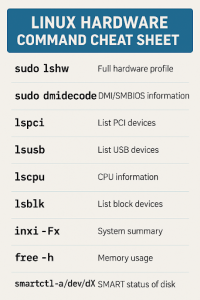
Linux offers a robust set of built-in commands to audit hardware without installing additional software. Here are the most useful tools:
-
lshw– Provides a detailed hardware overview including CPU, RAM, storage devices, network interfaces, and firmware versions.
Run:This saves a comprehensive report you can review anytime.
-
dmidecode– Reveals BIOS info, serial numbers, and hardware slot usage, invaluable for asset tracking.
Run: -
lspciandlsusb– List PCI and USB devices respectively, helpful for identifying attached peripherals and expansion cards.
Run: -
lscpu– Details CPU architecture, core counts, and cache sizes.
Run: -
lsblk– Shows block devices such as hard drives and partitions.
Run: -
inxi– A user-friendly tool summarizing most hardware components (may require installation).
Run:
Checking Specific Hardware Components
To pinpoint issues, you’ll want to check memory, storage, and network health separately.
Memory Health
-
free -h— Displays current memory usage. -
vmstat— Offers real-time stats on memory, CPU, and I/O. -
dmidecode -t memory— Lists memory module details like capacity and speed.
Storage Health
-
df -h— Shows disk space usage by mounted filesystems. -
iostat -xz 1— Monitors disk I/O performance live. -
smartctl -a /dev/sdX— Runs SMART diagnostics on drives to detect early failure signs.
Network Health
-
ethtool eth0— Reports network interface card status and error stats. -
ip link— Checks link status. -
pingandtraceroute— Verify connectivity and latency.
Network bottlenecks or hardware errors here can disrupt data flow as badly as failing disks.
Interpreting Your Results: What to Watch For
Knowing what the output means is key:
-
Disks: Watch for “pre-fail” SMART alerts, increasing bad sectors, or slow read/write speeds.
-
Memory: Identify mismatched speeds, missing modules, or reduced slots which may hint at failing RAM.
-
CPU: Check for throttling or cores running below expected frequency.
-
Network: Look for duplex mismatches or high packet loss.
Ignoring these signs can jeopardize the performance of critical workloads like Hadoop clusters or database servers.

Automating Hardware Checks Across Your Fleet
For organizations managing dozens or hundreds of Linux servers, manual checks aren’t scalable. Automation is the answer:
-
Write shell scripts that run key commands and save reports.
-
Use SSH combined with cron jobs to schedule these scripts on all servers.
-
Centralize logs on a monitoring server for easy review.
-
Integrate with tools like Nagios, Zabbix, or Prometheus to alert you when hardware anomalies occur.
Automation ensures you catch emerging issues before they cause outages.
Real-World Impact: Avoiding Costly Downtime
Consider a recent case where a logistics company lost over $2 million in revenue after a critical analytics server’s hard drive failed unexpectedly. A routine Linux hardware check would have flagged the drive’s deteriorating health weeks before the outage, allowing for a planned replacement.
Bonus: Boost Server Resale Value with Hardware Health Reports
When it’s time to retire or upgrade servers, documented hardware health reports can boost resale prices by 10–20%. Buyers value transparency, making your equipment easier to sell and reducing negotiation friction.
Final Thoughts: Don’t Wait Until It’s Too Late
Checking server hardware in Linux isn’t just a routine task — it’s a vital part of IT infrastructure health. With just a few simple commands and smart automation, you can prevent unexpected failures, stay compliant, and even recoup value when upgrading.
Start your server health checks today and keep your data supply chain running smoothly.
Ready to Upgrade or Decommission Servers?
At WeBuyUsedITequipment.net, we offer fast, secure buyback programs with certified data destruction, ensuring compliance and maximum value for your used servers. Get a free hardware valuation now.
