Skip to content
Facebook Instagram X-twitter Youtube Linkedin

West Coast: (800) 700-7683 — East Coast: (800) 821-1782 — 9033 9th St. Rancho Cucamonga, CA 91730

We Buy Used IT Equipment
Powered By DES
  • Sell Your Equipment
    • Servers
      • Cisco
      • Dell
      • IBM
      • HP
      • Lenovo
      • SuperMicro
    • Backup Tapes
      • LTO Tapes
        • LTO10
        • LTO9
        • LTO8
        • LTO7
        • LTO6
        • LTO5
        • LTO4
        • LTO3
        • LTO Cleaning Tape
      • 3592 Tapes
        • 3592 JK
        • 3592 JE
        • 3592 JD
        • 3592 JC
        • 3592 JB
        • 3592 JA
      • T10k T2 Tapes
      • MLR/SLR Tapes
        • IBM MLR1 SLR32
        • Imation SLR32
        • Sony SLR5
        • Tandberg SLR
        • MLR/SLR Cleaning Tape
      • 4mm Tapes
        • DDS7 – DAT320
        • DDS6 – DAT160
        • DDS5 – DAT72
        • DDS4 – DAT40
      • 8mm VXA Tapes
    • Data Storage
      • Hard Drives
        • HGST
        • Hitachi
        • HP
        • IBM
        • Kingston
        • Samsung
        • Seagate
        • Toshiba
        • Western Digital
      • Storage Arrays
    • Networking
      • Routers
      • Switches
    • VoIP and Telecom
    • Memory
      • Server Memory
      • Laptop Memory
      • Desktop Memory
      • DDR3
      • DDR4
      • DDR5
    • CPUs and Processors
      • Intel Core
      • Intel Xeon
      • AMD
    • Laptops
      • Apple
      • Asus
      • Dell
      • HP
      • IBM Lenovo
      • Samsung
      • Toshiba
    • Tape Drives and Libraries
    • SFP Transceivers
      • Cisco SFP Transceivers
      • HPE SFP Transceivers
    • Scrap Electronics
    • Submit Your List
  • Services
    • Secure IT Asset Disposition
      • Secure Shipping
    • Data Center Services
      • Takeouts
      • Relocation
      • Liquidation
      • Other On-Site Services
    • Data Destruction
      • Data Destruction Compliance
        • Certificate of Data Destruction
        • Physical Data Destruction
        • Permanent Data Erasure
        • Magnetic Degaussing
      • Data Tape Erasure
      • Hard Drive Disposition
        • Hard Drive Sanitization
    • Electronics Recycling
    • Global Advantage Partner
    • Donate to Charity
  • Buy Equipment
    • Backup Tape
    • Data Center Equipment
    • New Equipment
    • Refurbished Equipment
      • Refurbished Servers
    • Warranty Information
  • Lifecycle & Sustainability
    • Lifecycle Services
      • Secure IT Asset Disposition
      • Electronics Recycling
      • Donate IT Equipment to Charity
      • Our ITAD Process
      • Secure Equipment Shipping
    • Resources
      • IT Equipment Recycling
      • E Waste Recycling
      • IT Asset Disposition Guide
      • Data Center Decommissioning
      • Comprehensive Guide to ITAD
      • Guide to Donating IT Equipment to Charity
  • Blog
  • About Us
    • Contact Us
    • Our Processes
    • ITAD White Paper
    • Newsletter
    • References
    • Privacy Policy
    • FAQ
    • Sitemap
  • Get A Quote
  • Sell Your Equipment
    • Servers
      • Cisco
      • Dell
      • IBM
      • HP
      • Lenovo
      • SuperMicro
    • Backup Tapes
      • LTO Tapes
        • LTO10
        • LTO9
        • LTO8
        • LTO7
        • LTO6
        • LTO5
        • LTO4
        • LTO3
        • LTO Cleaning Tape
      • 3592 Tapes
        • 3592 JK
        • 3592 JE
        • 3592 JD
        • 3592 JC
        • 3592 JB
        • 3592 JA
      • T10k T2 Tapes
      • MLR/SLR Tapes
        • IBM MLR1 SLR32
        • Imation SLR32
        • Sony SLR5
        • Tandberg SLR
        • MLR/SLR Cleaning Tape
      • 4mm Tapes
        • DDS7 – DAT320
        • DDS6 – DAT160
        • DDS5 – DAT72
        • DDS4 – DAT40
      • 8mm VXA Tapes
    • Data Storage
      • Hard Drives
        • HGST
        • Hitachi
        • HP
        • IBM
        • Kingston
        • Samsung
        • Seagate
        • Toshiba
        • Western Digital
      • Storage Arrays
    • Networking
      • Routers
      • Switches
    • VoIP and Telecom
    • Memory
      • Server Memory
      • Laptop Memory
      • Desktop Memory
      • DDR3
      • DDR4
      • DDR5
    • CPUs and Processors
      • Intel Core
      • Intel Xeon
      • AMD
    • Laptops
      • Apple
      • Asus
      • Dell
      • HP
      • IBM Lenovo
      • Samsung
      • Toshiba
    • Tape Drives and Libraries
    • SFP Transceivers
      • Cisco SFP Transceivers
      • HPE SFP Transceivers
    • Scrap Electronics
    • Submit Your List
  • Services
    • Secure IT Asset Disposition
      • Secure Shipping
    • Data Center Services
      • Takeouts
      • Relocation
      • Liquidation
      • Other On-Site Services
    • Data Destruction
      • Data Destruction Compliance
        • Certificate of Data Destruction
        • Physical Data Destruction
        • Permanent Data Erasure
        • Magnetic Degaussing
      • Data Tape Erasure
      • Hard Drive Disposition
        • Hard Drive Sanitization
    • Electronics Recycling
    • Global Advantage Partner
    • Donate to Charity
  • Buy Equipment
    • Backup Tape
    • Data Center Equipment
    • New Equipment
    • Refurbished Equipment
      • Refurbished Servers
    • Warranty Information
  • Lifecycle & Sustainability
    • Lifecycle Services
      • Secure IT Asset Disposition
      • Electronics Recycling
      • Donate IT Equipment to Charity
      • Our ITAD Process
      • Secure Equipment Shipping
    • Resources
      • IT Equipment Recycling
      • E Waste Recycling
      • IT Asset Disposition Guide
      • Data Center Decommissioning
      • Comprehensive Guide to ITAD
      • Guide to Donating IT Equipment to Charity
  • Blog
  • About Us
    • Contact Us
    • Our Processes
    • ITAD White Paper
    • Newsletter
    • References
    • Privacy Policy
    • FAQ
    • Sitemap
  • Get A Quote

How to Protect Your Server From a Ransomware Attack

Cybersecurity, Data Security, Servers
  • Alex
  • May 28, 2022
  • 7:50 pm
Browse:
Home Cybersecurity How to Protect Your Server From a Ransomware Attack

One of the greatest threats faced by servers today is ransomware. Backups can be authorized by IP address or server variables, or even simply changing email access. In this article, learn about these and other methods to protect your server from ransomware.

What is ransomware?

Ransomware is a type of malware that encrypts a computer system’s data and demands a ransom to decrypt it. Once infected, ransomware can prevent users from accessing their files or logs, making it difficult to investigate and solve the issue.

The popularity of ransomware has increased in recent years as cybercriminals have found it to be an effective way to make money.

Ransomware is a type of cyberattack that encrypts files on a server or computer and demands a ransom from the victim to get the files back. While ransomware is not new, it has become more prevalent in recent years because of the high demand for ransom payments from criminals.

There are many ways you can protect your server from ransomware. The most basic way to protect your server is to maintain good security practices on all systems and networks connected to it. You can also install security software and employ security protocols such as firewalls and virtual private networks (VPNs) to help protect your server from malicious actors. Finally, you can back up your data regularly and create a restoration plan in case of ransomware attacks.

PREVENTING RANSOMWARE: One way to protect your server from ransomware is to install antivirus software, keep up-to-date with the latest patches, and use strong passwords. Another way is to back up your data regularly and stores it offline or in a separate secure location.

https://youtu.be/H6rYEy6pcQo

Why should you protect your server from ransomware?

Server encryption not only prevents unauthorized access to your data but can also help protect your server from ransomware. Here are a few reasons why server encryption should be a top priority:

1. Ransomware is one of the most common types of cyberattacks.

2. A ransomware attack can damage or even delete your data, and can cost you a lot of money in lost revenue.

3. Server encryption can protect your data from ransomware attacks, and it can also protect your server from other types of attacks.

4. Server encryption can keep your business information safe, and it can also keep your business confidential.

5. Server encryption can help protect your business against possible legal liability.

6. Server encryption can keep your data safe from inexperienced workers, who might accidentally make “mistakes” in their work.

7. Improved security for servers has many business benefits: less access for unauthorized persons, better network integrity, and reduced vulnerability to exploits that could cause damage or lead to loss of client information.

8. If you want to decrease the chances of identity theft, you should implement server encryption before sensitive data is in unprotected files on your network drives that other people or malicious attackers could steal.

9. Encryption will help prevent threats like botnets, email spam, and malware specially designed to use valid system information or localhost DNS lookups to entice unsuspecting users into running dangerous software they would not normally consider doing if they knew about any privacy risks involved.

10. The same is true for unsolicited instant messages, even by friends of your friends who could be using an encrypted messenger service that only you and a select few other people know about.

11. The more effort you put into securing servers as well as data files and network communications, the less likely you are going to be attractive targets for future security threats or attacks, based on which are the most vulnerable and how easy they would be to exploit given practical resources at hand.
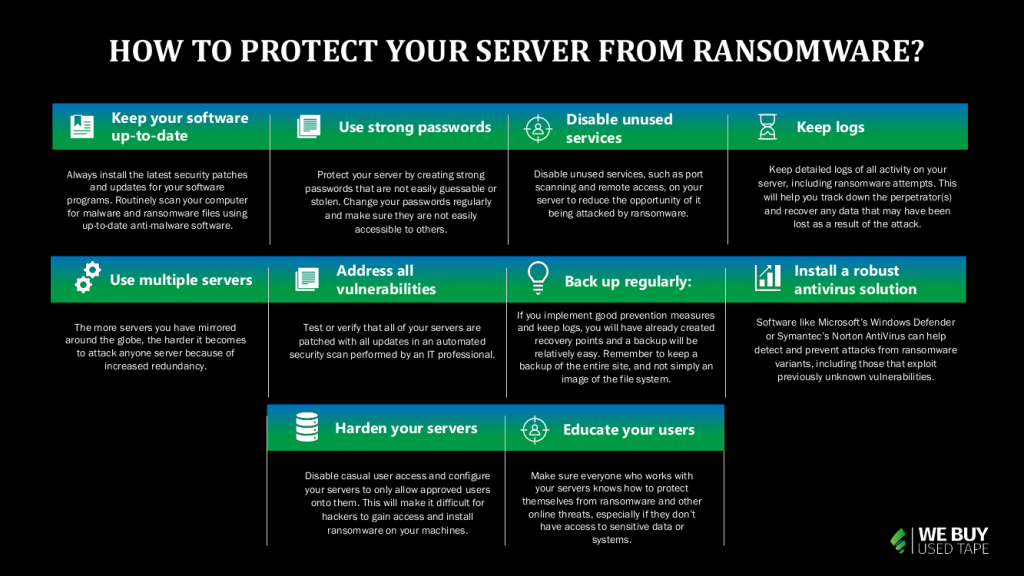
How to protect your server from ransomware?

Effective protection against ransomware begins with installing up-to-date security patches and antivirus software. You can also use specialized tools to identify and destroy ransomware files before they have a chance to infect your computer. Finally, you can protect your server from ransomware by following these tips:

1. Keep your software up-to-date: Always install the latest security patches and updates for your software programs. Routinely scan your computer for malware and ransomware files using up-to-date anti-malware software.

2. Use strong passwords: Protect your server by creating strong passwords that are not easily guessable or stolen. Change your passwords regularly and make sure they are not easily accessible to others.

3. Disable unused services: Disable unused services, such as port scanning and remote access, on your server to reduce the opportunity of it being attacked by ransomware.

4. Keep logs: Keep detailed logs of all activity on your server, including ransomware attempts. This will help you track down the perpetrator(s) and recover any data that may have been lost as a result of the attack.

5. Use multiple servers: The more servers you have mirrored around the globe, the harder it becomes to attack anyone server because of increased redundancy.

6. Address all vulnerabilities: Test or verify that all of your servers are patched with all updates in an automated security scan performed by an IT professional.

7. Back up regularly: If you implement good prevention measures and keep logs, you will have already created recovery points and a backup will be relatively easy.

 Remember to keep a backup of the entire site, and not simply an image of the file system.

8. Install a robust antivirus solution: Software like Microsoft’s Windows Defender or Symantec’s Norton AntiVirus can help detect and prevent attacks from ransomware variants, including those that exploit previously unknown vulnerabilities. Make sure to routinely update your antivirus software to ensure that it is up-to-date.

9. Harden your servers against external attacks: Disable casual user access and configure your servers to only allow approved users onto them. This will make it difficult for hackers to gain access and install ransomware on your machines. Also, keep an eye on the latest threats and patch your servers as necessary.

10. Educate your users: Make sure everyone who works with your servers knows how to protect themselves from ransomware and other online threats, especially if they don’t have access to sensitive data or systems.

By taking these steps, your organization can minimize the risk of being victimized by ransomware.

https://youtu.be/WYMycpL1fl4

How to Restore Server Partition

Recently ransomware was spreading like wildfire through Windows machines. This type of malware encrypts your data on the infected machine and asks for a ransom to release it. You can protect your server from ransomware using restores. Restores are an effective way of mitigating ransomware attacks because they allow you to restore specific files or folders if they become encrypted. If your server is infected with ransomware, restoring files will help you resolve the issue and avoid paying the ransom.

Conclusion

Recently, ransomware has become a highly-targeted and dangerous form of malware. If you are running a server and are unfortunate enough to get targeted by ransomware, there are some things that you can do to help protect your system. First and foremost, back up your data frequently. Secondly, make sure that you have updated your antivirus software and firewall software regularly. Thirdly, monitor your server closely for any unusual activity or signs that someone is trying to penetrate your network.

Defenses against ransomware can include using a strong password and installing security updates regularly. You can also restrict the privileges of administrators so that they can’t do as much damage as an attacker without being detected.

Browse:
Home Cybersecurity How to Protect Your Server From a Ransomware Attack

Get A Quote

Phoenix Certified
Fill our form here
PrevPreviousHow to Recycle Corporate eWaste
NextIs Your PC Safe From Ransomware in 2022?Next
Picture of Alex

Alex

Expertise With over 15 years of experience in marketing and business development, Alex is a seasoned strategist in digital marketing, content creation, and brand growth, Ge has grown as a trusted voice in the technology and business sectors over the past decade. Education Alex holds a Master’s degree in Entrepreneurship and dual Bachelor’s degrees in Marketing and Entrepreneurial Management from California State University - San Bernardino. Experience Alex has led high-impact initiatives that have driven significant revenue growth, brand expansion, and customer engagement. His work includes managing e-commerce operations, optimizing digital advertising strategies, and developing content that educates and informs professionals about technology and business trends. Outside of Work Beyond his professional endeavors, Alex enjoys staying active and spending quality time with family.
All Posts

Client
Testimonials

“The buyback program was easy for me to use. I simply sent WEBUY an email with the list of surplus items that I had. WEBUY replied back with a quoted value. I then shipped WBUY the tapes and quickly received payment. The process was very easy and I felt good that I wasn’t throwing the equipment into the landfill and someone else can make use of them.

I will do business with WBUY again.”

Bay Industries Inc.

“I have to say once I found you the process was relatively quick and straightforward. Your website provided great details and once I submitted my inventory within 24 hours I had a quote and confirmation of the dollar amount.

The entire process from shipment to check in hand was painless and quick, I will most definitely use this service again and have already recommended it to my other peers.”

Masons of California

Subscribe to our newsletter

Your inbox deserves better. Sign up for regular updates, insights, and deals!

  • Sorry, this service is unavailable in your country.

  • Should be Empty:
Visit Us
  • 9th St. Rancho Cucamonga, CA 91730
  • West Coast: (800) 700-7683
  • East Coast: (800) 821-1782
  • Local: (909) 466-7680
We Buy Used IT Equipment

Powered By DES

Facebook Instagram X-twitter Youtube Linkedin
BUY EQUIPMENT
  • Backup Tape
  • New Equipment
  • Refurbished Equipment
  • Warranty Info
  • Backup Tape
  • New Equipment
  • Refurbished Equipment
  • Warranty Info
SELL EQUIPMENT
  • Servers
  • Backup Tape
  • Removable Storage
  • Telecom & VOIP
  • Networking & Switches
  • Memory
  • CPUs and Processors
  • Laptops
  • Tape Drives
  • SFP Transceivers
  • Scrap Electronics
  • Servers
  • Backup Tape
  • Removable Storage
  • Telecom & VOIP
  • Networking & Switches
  • Memory
  • CPUs and Processors
  • Laptops
  • Tape Drives
  • SFP Transceivers
  • Scrap Electronics
SERVICES
  • IT Asset Disposition
  • Data Destruction
  • Data Center Services
  • Secure Shipping
  • Donate Your Assets
  • International Sales
  • Onsite Services
  • Electronics Recycle
  • IT Asset Disposition
  • Data Destruction
  • Data Center Services
  • Secure Shipping
  • Donate Your Assets
  • International Sales
  • Onsite Services
  • Electronics Recycle
STAY INFORMED
  • Blog
  • About Us
  • Contact Us
  • Our Process
  • FAQ
  • Sitemap
  • Blog
  • About Us
  • Contact Us
  • Our Process
  • FAQ
  • Sitemap

© 2026 All Rights Reserved. Website created with ❤ by mrrssy.

Accessibility Adjustments

Powered by OneTap

How long do you want to hide the toolbar?
Hide Toolbar Duration
Select your accessibility profile
Vision Impaired Mode
Enhances website's visuals
Seizure Safe Profile
Clear flashes & reduces color
ADHD Friendly Mode
Focused browsing, distraction-free
Blindness Mode
Reduces distractions, improves focus
Epilepsy Safe Mode
Dims colors and stops blinking
Content Modules
Font Size

Default

Line Height

Default

Color Modules
Orientation Modules