Skip to content
Facebook Instagram X-twitter Youtube Linkedin

West Coast: (800) 700-7683 — East Coast: (800) 821-1782 — 9033 9th St. Rancho Cucamonga, CA 91730

We Buy Used IT Equipment
Powered By DES
  • Sell Your Equipment
    • Servers
      • Cisco
      • Dell
      • IBM
      • HP
      • Lenovo
      • SuperMicro
    • Backup Tapes
      • LTO Tapes
        • LTO10
        • LTO9
        • LTO8
        • LTO7
        • LTO6
        • LTO5
        • LTO4
        • LTO3
        • LTO Cleaning Tape
      • 3592 Tapes
        • 3592 JK
        • 3592 JE
        • 3592 JD
        • 3592 JC
        • 3592 JB
        • 3592 JA
      • T10k T2 Tapes
      • MLR/SLR Tapes
        • IBM MLR1 SLR32
        • Imation SLR32
        • Sony SLR5
        • Tandberg SLR
        • MLR/SLR Cleaning Tape
      • 4mm Tapes
        • DDS7 – DAT320
        • DDS6 – DAT160
        • DDS5 – DAT72
        • DDS4 – DAT40
      • 8mm VXA Tapes
    • Data Storage
      • Hard Drives
        • HGST
        • Hitachi
        • HP
        • IBM
        • Kingston
        • Samsung
        • Seagate
        • Toshiba
        • Western Digital
      • Storage Arrays
    • Networking
      • Routers
      • Switches
    • VoIP and Telecom
    • Memory
      • Server Memory
      • Laptop Memory
      • Desktop Memory
      • DDR3
      • DDR4
      • DDR5
    • CPUs and Processors
      • Intel Core
      • Intel Xeon
      • AMD
    • Laptops
      • Apple
      • Asus
      • Dell
      • HP
      • IBM Lenovo
      • Samsung
      • Toshiba
    • Tape Drives and Libraries
    • SFP Transceivers
      • Cisco SFP Transceivers
      • HPE SFP Transceivers
    • Scrap Electronics
    • Submit Your List
  • Services
    • Secure IT Asset Disposition
      • Secure Shipping
    • Data Center Services
      • Takeouts
      • Relocation
      • Liquidation
      • Other On-Site Services
    • Data Destruction
      • Data Destruction Compliance
        • Certificate of Data Destruction
        • Physical Data Destruction
        • Permanent Data Erasure
        • Magnetic Degaussing
      • Data Tape Erasure
      • Hard Drive Disposition
        • Hard Drive Sanitization
    • Electronics Recycling
    • Global Advantage Partner
    • Donate to Charity
  • Buy Equipment
    • Backup Tape
    • Data Center Equipment
    • New Equipment
    • Refurbished Equipment
      • Refurbished Servers
    • Warranty Information
  • Lifecycle & Sustainability
    • Lifecycle Services
      • Secure IT Asset Disposition
      • Electronics Recycling
      • Donate IT Equipment to Charity
      • Our ITAD Process
      • Secure Equipment Shipping
    • Resources
      • IT Equipment Recycling
      • E Waste Recycling
      • IT Asset Disposition Guide
      • Data Center Decommissioning
      • Comprehensive Guide to ITAD
      • Guide to Donating IT Equipment to Charity
  • Blog
  • About Us
    • Contact Us
    • Our Processes
    • ITAD White Paper
    • Newsletter
    • References
    • Privacy Policy
    • FAQ
    • Sitemap
  • Get A Quote
  • Sell Your Equipment
    • Servers
      • Cisco
      • Dell
      • IBM
      • HP
      • Lenovo
      • SuperMicro
    • Backup Tapes
      • LTO Tapes
        • LTO10
        • LTO9
        • LTO8
        • LTO7
        • LTO6
        • LTO5
        • LTO4
        • LTO3
        • LTO Cleaning Tape
      • 3592 Tapes
        • 3592 JK
        • 3592 JE
        • 3592 JD
        • 3592 JC
        • 3592 JB
        • 3592 JA
      • T10k T2 Tapes
      • MLR/SLR Tapes
        • IBM MLR1 SLR32
        • Imation SLR32
        • Sony SLR5
        • Tandberg SLR
        • MLR/SLR Cleaning Tape
      • 4mm Tapes
        • DDS7 – DAT320
        • DDS6 – DAT160
        • DDS5 – DAT72
        • DDS4 – DAT40
      • 8mm VXA Tapes
    • Data Storage
      • Hard Drives
        • HGST
        • Hitachi
        • HP
        • IBM
        • Kingston
        • Samsung
        • Seagate
        • Toshiba
        • Western Digital
      • Storage Arrays
    • Networking
      • Routers
      • Switches
    • VoIP and Telecom
    • Memory
      • Server Memory
      • Laptop Memory
      • Desktop Memory
      • DDR3
      • DDR4
      • DDR5
    • CPUs and Processors
      • Intel Core
      • Intel Xeon
      • AMD
    • Laptops
      • Apple
      • Asus
      • Dell
      • HP
      • IBM Lenovo
      • Samsung
      • Toshiba
    • Tape Drives and Libraries
    • SFP Transceivers
      • Cisco SFP Transceivers
      • HPE SFP Transceivers
    • Scrap Electronics
    • Submit Your List
  • Services
    • Secure IT Asset Disposition
      • Secure Shipping
    • Data Center Services
      • Takeouts
      • Relocation
      • Liquidation
      • Other On-Site Services
    • Data Destruction
      • Data Destruction Compliance
        • Certificate of Data Destruction
        • Physical Data Destruction
        • Permanent Data Erasure
        • Magnetic Degaussing
      • Data Tape Erasure
      • Hard Drive Disposition
        • Hard Drive Sanitization
    • Electronics Recycling
    • Global Advantage Partner
    • Donate to Charity
  • Buy Equipment
    • Backup Tape
    • Data Center Equipment
    • New Equipment
    • Refurbished Equipment
      • Refurbished Servers
    • Warranty Information
  • Lifecycle & Sustainability
    • Lifecycle Services
      • Secure IT Asset Disposition
      • Electronics Recycling
      • Donate IT Equipment to Charity
      • Our ITAD Process
      • Secure Equipment Shipping
    • Resources
      • IT Equipment Recycling
      • E Waste Recycling
      • IT Asset Disposition Guide
      • Data Center Decommissioning
      • Comprehensive Guide to ITAD
      • Guide to Donating IT Equipment to Charity
  • Blog
  • About Us
    • Contact Us
    • Our Processes
    • ITAD White Paper
    • Newsletter
    • References
    • Privacy Policy
    • FAQ
    • Sitemap
  • Get A Quote

HOW TO HANDLE TOXIC E-WASTE SAFELY

ewaste
  • Alex
  • April 27, 2022
  • 2:45 pm
Browse:
Home ewaste HOW TO HANDLE TOXIC E-WASTE SAFELY

The electronic waste that comes through our homes is often toxic. This can lead to accidents if you don’t handle it correctly or if the documents become exposed to humidity or dust. Here’s how to properly handle the toxic electronic waste.

What is electronic waste?

Electronic waste is any piece of equipment or product that the user no longer wants or needs. This can include desktop computers, laptops, monitors, cell phones, and peripherals.

Electronic waste can be a major environmental and health concern because it contains toxic chemicals and metals that can harm people and the environment when discarded incorrectly.

The best way to handle toxic electronic waste safely is to recycle it. Recycling separates the usable materials from the hazardous waste, reducing the impact of toxins on the environment.

There are private companies that recycle electronics for a fee, or you can drop them off at a local e-waste recycler.

What are the risks of toxic electronic waste?

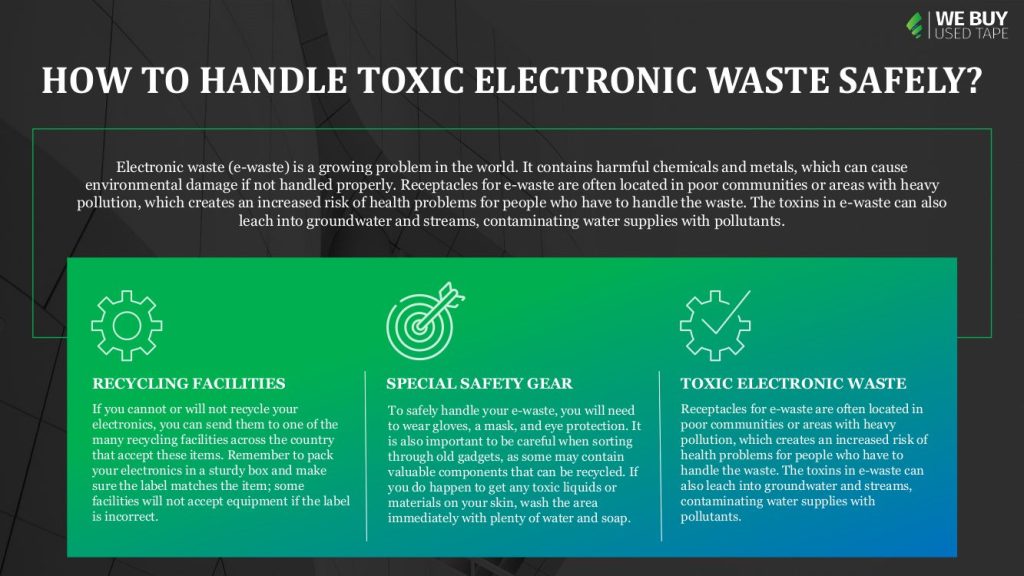
Electronic waste (e-waste) is a growing problem in the world. It contains harmful chemicals and metals, which can cause environmental damage if not handled properly.

Receptacles for e-waste are often located in poor communities or areas with heavy pollution, which creates an increased risk of health problems for people who have to handle the waste. The toxins in e-waste can also leach into groundwater and streams, contaminating water supplies with pollutants.

https://youtu.be/CKm7ZFApeiE

Here are some tips for handling toxic electronic waste safely:

1. Dispose of e-waste batteries properly. Batteries contain hazardous materials that can be harmful if released into the environment. If you have old batteries that you no longer use, take them to a recycling center or disposal site that accepts lead and acid batteries.

2. Do not throw electronic waste into the garbage (or open burning). Electronic waste contains toxic chemicals and metals that can contaminate the air and soil, as well as water supplies. Recycle electronic waste properly through special programs or drop it off at a special e-waste recycling site.

3. Do not touch or handle broken screens or components without proper protection. Opening up the phone exposes electronic components that are not suitable for disposal.

4. Do not cut, crack, or break plastic enclosures. Breaking these containers can release toxic chemical fumes and cause severe, even fatal burns to all persons near the abuse. Be aware of flammable material nearby, and prevent fires and injuries by always disposing of broken cellphones through proper modes of use first.

5. Avoid dropping your phone while you were simply handling it, as broken glass is highly dangerous, and chemical exposure can be severe. The chances of broken glass are higher when you drop your cell phone from waist level or above.
Tips for handling toxic chemicals safely

When it comes to handling Toxic electronic waste i.e., electrical and electronic equipment (EEE), it is important to remember that the chemicals in these items pose a serious threat both to the environment and to human health. Here are some tips for ensuring the safe disposal of EEE:

1. Always label your toxic material with the hazard symbol, including batteries, lightbulbs, PCs, monitors, and other electronic equipment. Write down what the materials are, where they came from and how to contact you if there are any problems.

2. Dispose of toxic material securely through a plastic bag.

3. Wash your hands thoroughly after touching anything that could have come into contact with toxic material.

4. Use recycling services that collect all types of electronic waste. You’ll reduce the number of hazardous materials that end up in landfills.

5. Don’t throw away computers, TVs, and other electronic devices with valuable data still on them. Unsold television sets and computer monitors can sometimes be recycled into new products.

6. If you have pictures, videos, or software on your old electronics that you no longer need, don’t just toss them in the trash. Consider donating them to a local school or university, an organization that recycles computer software, or the Smithsonian Institution.

7. Dispose of used batteries at the recycling station; not on the street where they can be confiscated by local authorities on environmental laws. The recycling stations have special equipment designed just for sorting and collecting batteries from non-standard alkaline, flashlights, and cell phones.

8. Use safe material handling procedures if you decide to recycle a hard drive into usable parts.

Throwing away old electronics is one of the most popular ways to deal with waste, but it’s not safe. Toxic chemicals used in products like computers, printers, and electronic games can leach out and can contaminate the soil, water supplies, and even people if they’re mishandled.

What to do if you suspect you or someone else has been poisoned by toxic chemicals?

If you or someone you know has been poisoned by toxic chemicals, the first step is to seek medical attention. However, there are some steps you can take to handle the situation safely yourself. Here are five tips:

1) If you have any doubt about whether or not a substance is poisonous, do not expose yourself or others to it. Instead, call a professional for help.

2) If you think you may have been poisoned, isolate yourself from other people and equipment until you can tell what the effects of the poison will be. Clean up any spills as soon as possible to avoid further exposure.

3) If the poison is water-soluble, like bleach or sodium hypochlorite, flush it down the toilet after pouring it out. If it’s oil-soluble, use a respirator and gloves to dispose of it in an appropriate container. Do not pour it down the drain.

4) Keep all poison containers and materials out of reach of children and pets. Poisoning can cause serious damage to their health if they consume the substance.

5) Report any suspicious incidents involving potentially poisonous substances to your local police or emergency medical services immediately.

Where can I dispose of these items?

There are a few ways to safely dispose of electronic waste, but first, you need to know where it can go.

The majority of electronic waste should be recycled, but there are specific exceptions for certain types of electronic waste, such as lead-acid batteries and computer monitors.

If you cannot or will not recycle your electronics, you can send them to one of the many recycling facilities across the country that accept these items. Remember to pack your electronics in a sturdy box and make sure the label matches the item; some facilities will not accept equipment if the label is incorrect.

https://youtu.be/ddVUdGTyEpI

Do I need special safety gear?

If you have ever handled electronic waste, you know that it can be harmful if not handled correctly. To safely handle your e-waste, you will need to wear gloves, a mask, and eye protection whenever possible. It is also important to keep an open mind when sorting through your old gadgets, as some may still contain valuable components that can be recycled. If you do happen to get any toxic liquids or materials on your skin, wash the area immediately with plenty of water and soap.

Conclusion

Irrefutable evidence exists that electronic waste, or e-waste, is harmful to both the environment and people. It’s time we all learn how to handle this hazardous material safely.

If you’re unsure whether an e-waste item is hazardous, start by checking the product’s label. If the product doesn’t have a label, then it’s likely not classified as an e-waste item.

Browse:
Home ewaste HOW TO HANDLE TOXIC E-WASTE SAFELY

Get A Quote

Phoenix Certified
Fill our form here
PrevPreviousWHAT TO KEEP IN MIND WHILE DROPPING OFF E-WASTE
NextIs Recycling eWaste Profitable for Your Business?Next
Picture of Alex

Alex

Expertise With over 15 years of experience in marketing and business development, Alex is a seasoned strategist in digital marketing, content creation, and brand growth, Ge has grown as a trusted voice in the technology and business sectors over the past decade. Education Alex holds a Master’s degree in Entrepreneurship and dual Bachelor’s degrees in Marketing and Entrepreneurial Management from California State University - San Bernardino. Experience Alex has led high-impact initiatives that have driven significant revenue growth, brand expansion, and customer engagement. His work includes managing e-commerce operations, optimizing digital advertising strategies, and developing content that educates and informs professionals about technology and business trends. Outside of Work Beyond his professional endeavors, Alex enjoys staying active and spending quality time with family.
All Posts

Client
Testimonials

“The buyback program was easy for me to use. I simply sent WEBUY an email with the list of surplus items that I had. WEBUY replied back with a quoted value. I then shipped WBUY the tapes and quickly received payment. The process was very easy and I felt good that I wasn’t throwing the equipment into the landfill and someone else can make use of them.

I will do business with WBUY again.”

Bay Industries Inc.

“I have to say once I found you the process was relatively quick and straightforward. Your website provided great details and once I submitted my inventory within 24 hours I had a quote and confirmation of the dollar amount.

The entire process from shipment to check in hand was painless and quick, I will most definitely use this service again and have already recommended it to my other peers.”

Masons of California

Subscribe to our newsletter

Your inbox deserves better. Sign up for regular updates, insights, and deals!

  • Sorry, this service is unavailable in your country.

  • Should be Empty:
Visit Us
  • 9th St. Rancho Cucamonga, CA 91730
  • West Coast: (800) 700-7683
  • East Coast: (800) 821-1782
  • Local: (909) 466-7680
We Buy Used IT Equipment

Powered By DES

Facebook Instagram X-twitter Youtube Linkedin
BUY EQUIPMENT
  • Backup Tape
  • New Equipment
  • Refurbished Equipment
  • Warranty Info
  • Backup Tape
  • New Equipment
  • Refurbished Equipment
  • Warranty Info
SELL EQUIPMENT
  • Servers
  • Backup Tape
  • Removable Storage
  • Telecom & VOIP
  • Networking & Switches
  • Memory
  • CPUs and Processors
  • Laptops
  • Tape Drives
  • SFP Transceivers
  • Scrap Electronics
  • Servers
  • Backup Tape
  • Removable Storage
  • Telecom & VOIP
  • Networking & Switches
  • Memory
  • CPUs and Processors
  • Laptops
  • Tape Drives
  • SFP Transceivers
  • Scrap Electronics
SERVICES
  • IT Asset Disposition
  • Data Destruction
  • Data Center Services
  • Secure Shipping
  • Donate Your Assets
  • International Sales
  • Onsite Services
  • Electronics Recycle
  • IT Asset Disposition
  • Data Destruction
  • Data Center Services
  • Secure Shipping
  • Donate Your Assets
  • International Sales
  • Onsite Services
  • Electronics Recycle
STAY INFORMED
  • Blog
  • About Us
  • Contact Us
  • Our Process
  • FAQ
  • Sitemap
  • Blog
  • About Us
  • Contact Us
  • Our Process
  • FAQ
  • Sitemap

© 2026 All Rights Reserved. Website created with ❤ by mrrssy.

Accessibility Adjustments

Powered by OneTap

How long do you want to hide the toolbar?
Hide Toolbar Duration
Select your accessibility profile
Vision Impaired Mode
Enhances website's visuals
Seizure Safe Profile
Clear flashes & reduces color
ADHD Friendly Mode
Focused browsing, distraction-free
Blindness Mode
Reduces distractions, improves focus
Epilepsy Safe Mode
Dims colors and stops blinking
Content Modules
Font Size

Default

Line Height

Default

Color Modules
Orientation Modules