Skip to content
Facebook Instagram X-twitter Youtube Linkedin Phone

9033 9th St. Rancho Cucamonga, CA 91730

Menu
  • (800) 700-7683
Get A Quote
  • Sell Your Equipment
    • Servers
    • Storage Equipment
    • Networking Equipment
    • Tape Media
    • Memory
    • CPUs
    • Laptops
    • Telecom
    • Data Center Lots
    • Get a Quote
  • How It Works
    • Equipment Buyback Guide
    • The Complete Server Buyback Guide
    • Network Equipment Buyback Guide
    • Get A Quote
    • Secure Shipping
    • FAQ
  • Industries
    • Enterprise
    • Healthcare
    • Finance
    • Government
    • Education
    • MSPs & VARs
    • Data Centers
    • International
  • Resources
    • About Us
    • Contact Us
    • Blog
    • Videos
    • Case Studies
  • DES Services
    • ITAD Services
    • Data Destruction
    • NIST 800-88
    • Data Center Decommissioning
    • Electronics Recycling
    • Compliance & Certifications
  • Sell Your Equipment
    • Servers
    • Storage Equipment
    • Networking Equipment
    • Tape Media
    • Memory
    • CPUs
    • Laptops
    • Telecom
    • Data Center Lots
    • Get a Quote
  • How It Works
    • Equipment Buyback Guide
    • The Complete Server Buyback Guide
    • Network Equipment Buyback Guide
    • Get A Quote
    • Secure Shipping
    • FAQ
  • Industries
    • Enterprise
    • Healthcare
    • Finance
    • Government
    • Education
    • MSPs & VARs
    • Data Centers
    • International
  • Resources
    • About Us
    • Contact Us
    • Blog
    • Videos
    • Case Studies
  • DES Services
    • ITAD Services
    • Data Destruction
    • NIST 800-88
    • Data Center Decommissioning
    • Electronics Recycling
    • Compliance & Certifications
  • Sell Your Equipment
    • Servers
    • Storage Equipment
    • Networking Equipment
    • Tape Media
    • Memory
    • CPUs
    • Laptops
    • Telecom
    • Data Center Lots
    • Get a Quote
  • How It Works
    • Equipment Buyback Guide
    • The Complete Server Buyback Guide
    • Network Equipment Buyback Guide
    • Get A Quote
    • Secure Shipping
    • FAQ
  • Industries
    • Enterprise
    • Healthcare
    • Finance
    • Government
    • Education
    • MSPs & VARs
    • Data Centers
    • International
  • Resources
    • About Us
    • Contact Us
    • Blog
    • Videos
    • Case Studies
  • DES Services
    • ITAD Services
    • Data Destruction
    • NIST 800-88
    • Data Center Decommissioning
    • Electronics Recycling
    • Compliance & Certifications
Get A Quote

Check Server Hardware in Linux — Commands, Automation & Big Data Supply Reliability

Big Data, Computers, Data Center Services, Servers
  • Alex
  • August 12, 2025
  • 8:59 pm
Browse:
Home Big Data Check Server Hardware in Linux — Commands, Automation & Big Data Supply Reliability

In today’s data-driven world, servers aren’t just machines sitting in a closet — they’re the backbone of your entire IT ecosystem. Especially when running Linux-based systems powering big data, cloud services, or critical applications, knowing the health status of your server hardware can save your business from unexpected downtime and costly disruptions.

If you’re wondering, “How do I check server hardware in Linux fast and effectively?”, you’re in the right place. This guide breaks down essential commands and best practices, helping IT teams, sysadmins, and decision-makers keep their infrastructure running smoothly.

Why Checking Server Hardware in Linux Is Critical

Ignoring server hardware health is a risk no business can afford. Even one failing component — like a degraded memory module or a faulty disk — can cause performance bottlenecks, data loss, or security vulnerabilities. Here’s why regular hardware checks matter:

  • Prevent Performance Drops: Hardware issues can silently degrade CPU, RAM, or storage performance, slowing down critical workloads.

  • Maintain Security: Outdated firmware or unknown hardware can open attack vectors for cyber threats.

  • Ensure Compliance: Regulations like HIPAA, PCI-DSS, and GDPR require documented hardware monitoring and maintenance.

  • Avoid Costly Downtime: Unexpected server failures lead to expensive repairs and loss of business continuity.

  • Maximize Asset Value: Documented hardware health increases resale value when upgrading or decommissioning servers.

Essential Linux Commands to Check Server Hardware

Linux offers a robust set of built-in commands to audit hardware without installing additional software. Here are the most useful tools:

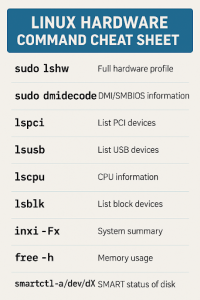
  • lshw – Provides a detailed hardware overview including CPU, RAM, storage devices, network interfaces, and firmware versions.
    Run:

    bash
    sudo lshw > hardware-report.txt

    This saves a comprehensive report you can review anytime.

  • dmidecode – Reveals BIOS info, serial numbers, and hardware slot usage, invaluable for asset tracking.
    Run:

    bash
    sudo dmidecode | less
  • lspci and lsusb – List PCI and USB devices respectively, helpful for identifying attached peripherals and expansion cards.
    Run:

    bash
    lspci
    lsusb
  • lscpu – Details CPU architecture, core counts, and cache sizes.
    Run:

    bash
    lscpu
  • lsblk – Shows block devices such as hard drives and partitions.
    Run:

    bash
    lsblk
  • inxi – A user-friendly tool summarizing most hardware components (may require installation).
    Run:
    bash
    inxi -Fx

linux cheat sheet

Checking Specific Hardware Components

To pinpoint issues, you’ll want to check memory, storage, and network health separately.

Memory Health

  • free -h — Displays current memory usage.

  • vmstat — Offers real-time stats on memory, CPU, and I/O.

  • dmidecode -t memory — Lists memory module details like capacity and speed.

Storage Health

  • df -h — Shows disk space usage by mounted filesystems.

  • iostat -xz 1 — Monitors disk I/O performance live.

  • smartctl -a /dev/sdX — Runs SMART diagnostics on drives to detect early failure signs.

Network Health

  • ethtool eth0 — Reports network interface card status and error stats.

  • ip link — Checks link status.

  • ping and traceroute — Verify connectivity and latency.

Network bottlenecks or hardware errors here can disrupt data flow as badly as failing disks.

Interpreting Your Results: What to Watch For

Knowing what the output means is key:

  • Disks: Watch for “pre-fail” SMART alerts, increasing bad sectors, or slow read/write speeds.

  • Memory: Identify mismatched speeds, missing modules, or reduced slots which may hint at failing RAM.

  • CPU: Check for throttling or cores running below expected frequency.

  • Network: Look for duplex mismatches or high packet loss.

Ignoring these signs can jeopardize the performance of critical workloads like Hadoop clusters or database servers.

professional IT administrator using a laptop or terminal to run Linux commands, with a server rack in the background, focusing on hardware monitoring

Automating Hardware Checks Across Your Fleet

For organizations managing dozens or hundreds of Linux servers, manual checks aren’t scalable. Automation is the answer:

  • Write shell scripts that run key commands and save reports.

  • Use SSH combined with cron jobs to schedule these scripts on all servers.

  • Centralize logs on a monitoring server for easy review.

  • Integrate with tools like Nagios, Zabbix, or Prometheus to alert you when hardware anomalies occur.

Automation ensures you catch emerging issues before they cause outages.

Real-World Impact: Avoiding Costly Downtime

Consider a recent case where a logistics company lost over $2 million in revenue after a critical analytics server’s hard drive failed unexpectedly. A routine Linux hardware check would have flagged the drive’s deteriorating health weeks before the outage, allowing for a planned replacement.

Bonus: Boost Server Resale Value with Hardware Health Reports

When it’s time to retire or upgrade servers, documented hardware health reports can boost resale prices by 10–20%. Buyers value transparency, making your equipment easier to sell and reducing negotiation friction.

Final Thoughts: Don’t Wait Until It’s Too Late

Checking server hardware in Linux isn’t just a routine task — it’s a vital part of IT infrastructure health. With just a few simple commands and smart automation, you can prevent unexpected failures, stay compliant, and even recoup value when upgrading.

Start your server health checks today and keep your data supply chain running smoothly.

Ready to Upgrade or Decommission Servers?

At WeBuyUsedITequipment.net, we offer fast, secure buyback programs with certified data destruction, ensuring compliance and maximum value for your used servers. Get a free hardware valuation now.

Request a Quote Today!

Browse:
Home Big Data Check Server Hardware in Linux — Commands, Automation & Big Data Supply Reliability

Phoenix
Certified

Learn More.

Get A Quote

Fill our form here
Picture of Alex

Alex

Expertise With over 15 years of experience in marketing and business development, Alex is a seasoned strategist in digital marketing, content creation, and brand growth, Ge has grown as a trusted voice in the technology and business sectors over the past decade. Education Alex holds a Master’s degree in Entrepreneurship and dual Bachelor’s degrees in Marketing and Entrepreneurial Management from California State University - San Bernardino. Experience Alex has led high-impact initiatives that have driven significant revenue growth, brand expansion, and customer engagement. His work includes managing e-commerce operations, optimizing digital advertising strategies, and developing content that educates and informs professionals about technology and business trends. Outside of Work Beyond his professional endeavors, Alex enjoys staying active and spending quality time with family.
PrevPreviousThe Reel Deal: LTO Tape Storage in the Motion Picture Industry
NextThe Ultimate Guide to Data SanitizationNext

Client
Testimonials

“The buyback program was easy for me to use. I simply sent WEBUY an email with the list of surplus items that I had. WEBUY replied back with a quoted value. I then shipped WBUY the tapes and quickly received payment. The process was very easy and I felt good that I wasn’t throwing the equipment into the landfill and someone else can make use of them.

I will do business with WBUY again.”

Bay Industries Inc.

“I have to say once I found you the process was relatively quick and straightforward. Your website provided great details and once I submitted my inventory within 24 hours I had a quote and confirmation of the dollar amount.

The entire process from shipment to check in hand was painless and quick, I will most definitely use this service again and have already recommended it to my other peers.”

Masons of California

Subscribe To Our Newsletter

Your inbox deserves better. Sign up for regular updates, insights, and deals!

  • Sorry, this service is unavailable in your country.

  • Should be Empty:
Facebook Instagram X-twitter Youtube Linkedin
BUY EQUIPMENT
  • Backup Tape
  • New Equipment
  • Refurbished Equipment
  • Warranty Info
  • Backup Tape
  • New Equipment
  • Refurbished Equipment
  • Warranty Info
SELL EQUIPMENT
  • Servers
  • Backup Tape
  • Removable Storage
  • Telecom & VOIP
  • Networking & Switches
  • Memory
  • CPUs and Processors
  • Laptops
  • Tape Drives
  • SFP Transceivers
  • Scrap Electronics
  • Servers
  • Backup Tape
  • Removable Storage
  • Telecom & VOIP
  • Networking & Switches
  • Memory
  • CPUs and Processors
  • Laptops
  • Tape Drives
  • SFP Transceivers
  • Scrap Electronics
SERVICES
  • IT Asset Disposition
  • Data Destruction
  • Data Center Services
  • Secure Shipping
  • Donate Your Assets
  • International Sales
  • Onsite Services
  • Electronics Recycle
  • IT Asset Disposition
  • Data Destruction
  • Data Center Services
  • Secure Shipping
  • Donate Your Assets
  • International Sales
  • Onsite Services
  • Electronics Recycle
Visit Us
  • 9033 9th St. Rancho Cucamonga, CA 91730
  • West Coast: +1 (800) 700-7683
  • East Coast: +1 (800) 821-1782
  • Local: +1 (909) 466-7680

© 2026 DES Technologies. All Rights Reserved. Website created with 💛 by mrrssy.

Accessibility Adjustments

Powered by OneTap

How long do you want to hide the toolbar?
Hide Toolbar Duration
Select your accessibility profile
Vision Impaired Mode
Enhances website's visuals
Seizure Safe Profile
Clear flashes & reduces color
ADHD Friendly Mode
Focused browsing, distraction-free
Blindness Mode
Reduces distractions, improves focus
Epilepsy Safe Mode
Dims colors and stops blinking
Content Modules
Font Size

Default

Line Height

Default

Color Modules
Orientation Modules

We use cookies to provide you with the best browsing experience, personalize content of our site, analyse its traffic and show you relevant ads. See our privacy policy for more information.


Powered by WP Full Picture

Statistics

I want to help you make this site better so I will provide you with data about my use of this site.

Personalisation

I want to have the best experience on this site so I agree to saving my choices, recommending things I may like and modifying the site to my liking

Marketing

I want to see ads with your offers, coupons and exclusive deals rather than random ads from other advertisers.

Powered by WP Full Picture

Search